01
Concept design · Legal services
Legal client app concept
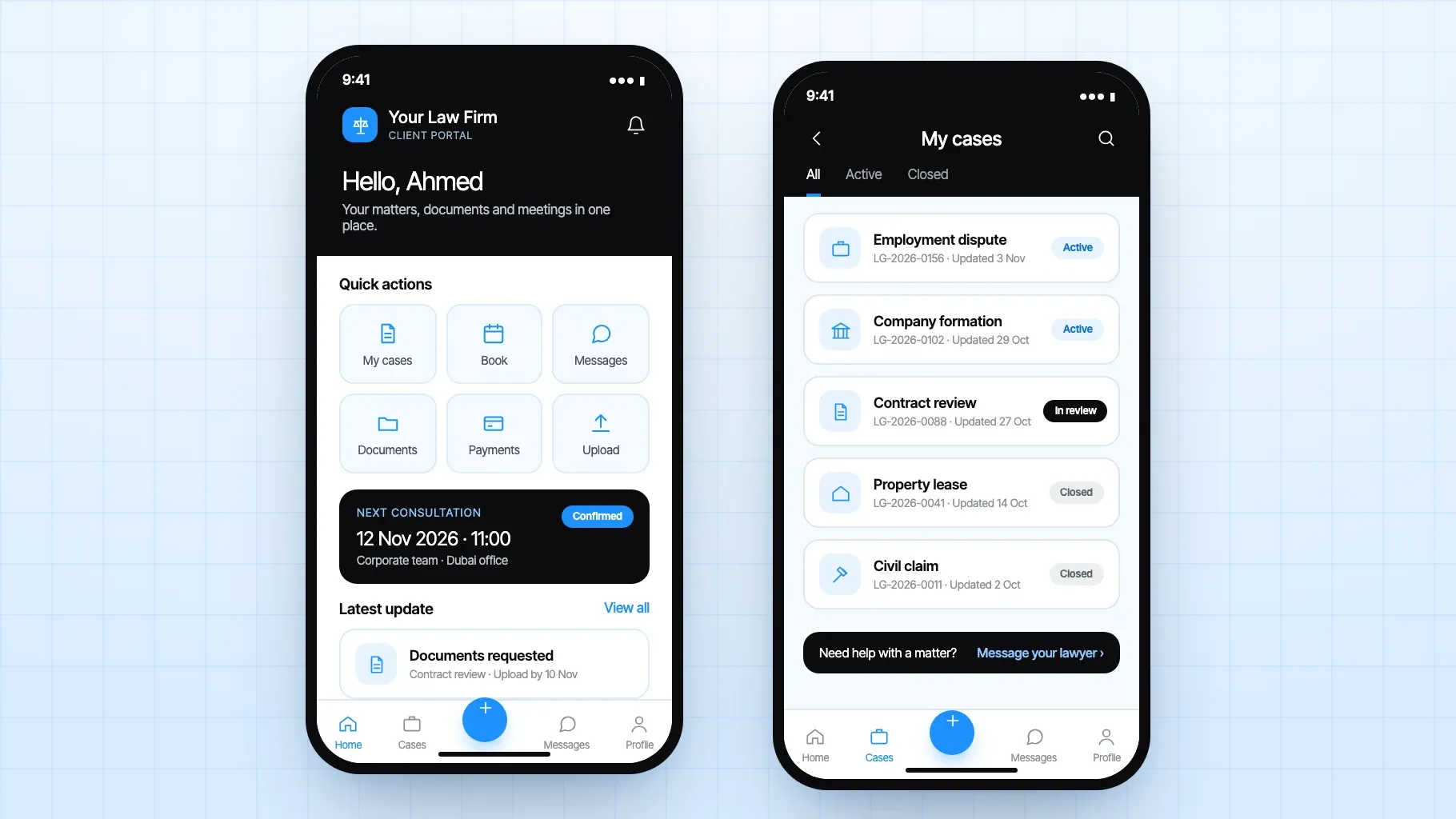
A home screen with quick actions and the next consultation, and a My cases list with the status of every matter.
Discuss a similar buildServices · Mobile app development · Legal services apps
We plan, design and build legal services apps for law firms, legal consultants and corporate legal teams in Dubai. Consultation booking, document intake, case updates, payments and client support sit in one secure app, so clients reach the right person and your team works from one organised system.
The app does not replace legal advice. It makes access to that advice faster and easier to manage, and it keeps client information out of scattered emails and personal chats.
200+ companies servedFrom a first store to an ADX listed developer









What the app can include
A client does not open a legal app to read a profile page. They open it to book a consultation, send a document, check a matter or settle an invoice. These are the parts we build, connected in the order your firm works.
Clear categories for the practice areas you offer, such as corporate, employment, real estate, family or disputes, with guided questions so a new client describes the issue in plain language.
Enquiries arrive sorted by practice area, with the details a lawyer needs.
Available slots, office or video meetings, reminders and intake questions answered before the appointment, so the first meeting starts with the facts already on file.
Fewer calls to reception, better prepared consultations.
Clients submit Emirates ID, contracts or company documents inside the app, with labels, status notes and routing to the person reviewing them.
Documents in one place, not spread across email and chat.
Simple stages such as under review, awaiting documents, scheduled and closed, so clients can see where their matter stands without calling for an update.
Clients stay informed and your team answers fewer status calls.
Structured messages tied to each matter, visible to the right staff, and kept away from disconnected personal chats.
Every conversation stays on the record of the matter.
Optional billing flows where clients see payment requests, pay securely and keep a history of what has been settled.
Invoices seen and settled inside the app.
Reminders for appointments, missing documents, follow ups and important changes, sent at the moment the client needs to act.
Fewer missed meetings and fewer stalled matters.
An admin view for lawyers, paralegals and support staff to review, assign and follow up, with reporting for managing partners.
Every enquiry has an owner and a next step.
Who this is for
A legal app must put clarity, controlled access and dependable communication ahead of engagement tricks. Here is how we approach the three most common starting points.
We start with the journeys that matter most, usually a new client booking a consultation and an existing client sending documents, and build a focused first version your staff can adopt quickly.
A focused first release beats a large one nobody uses.
Many law firm apps show services and lawyer profiles but cannot take a booking, a document or a payment. We turn that app into a working service channel connected to how your team reviews and responds.
Larger teams need role based permissions, multi practice routing, company accounts with several authorised contacts, and reporting. We plan these as a connected platform rather than a booking tool with a legal logo.
Concept design
Illustrative screens in our design, not a client project. Your app would carry your firm’s own name, colours and practice areas.
Concept design · Legal services
A home screen with quick actions and the next consultation, and a My cases list with the status of every matter.
Discuss a similar buildHow we work together
Most firms start with a fixed scope first version, then keep the app improving on a retainer. Larger legal teams sometimes take a dedicated team for a longer programme.
A defined build with a deadline
We agree what the product has to do, write it down with a price and a date, and build exactly that. Changes are priced before they are made, not discovered on the invoice.
A product that keeps evolving
Named engineers who work your hours, join your standups and stay on the codebase. You direct the backlog; we own the quality of what ships.
Something live that needs looking after
A monthly block of hours for improvements, fixes and the small requests that otherwise wait months. Unused hours carry for a quarter.
Technology
Chosen to fit your firm, your existing systems and the team who will own the app afterwards.
01Mobile
02Data and cloud
03Marketing and tracking
Booking, secure document upload, case updates and messaging, at minimum.
Clients need to see what services you offer, request a consultation, upload documents safely and get updates without repeated calls. Your team needs enquiries sorted, files in one place and a clear owner for each request. Payments, notifications and staff dashboards usually follow in the same release or the next.
Schedule a free consultation and get a written recommendation, with costs, before you commit to anything.
Get in touchPROVEN RESULTS
 Swift
Swift Kotlin
 Flutter
 React Native
 PostgreSQL
 MySQL
MySQL MongoDB
 AWS
AWS Azure
Azure Docker
 GA4
GA4 Google Tag Manager
 Search Console
 Meta Pixel
 Looker Studio