 Digital TransformationReplatforming From Drupal, AEM or .NET Without DowntimeWebsite replatforming from Drupal, AEM or .NET without downtime: choose the target platform, run delta content syncs, plan the cutover and test your rollback.
CodeeoInsightsDigital Transformation
The Hidden Risk of Cheap Hosting for Corporate Websites
Cheap web hosting risks for corporate sites: estimate downtime cost, judge shared hosting security, write a backup policy and see when managed hosting pays off.
The main cheap web hosting risks for a corporate website are not about the monthly invoice. They sit in three places: how often the site goes down and how long it stays down, how exposed it is when a neighbour on the same server is compromised, and whether a usable backup exists on the day you need it. This guide shows how to put a rough business value on each risk so the hosting decision is made on evidence rather than on the lowest quote.
Why cheap web hosting risks are a board level question
For a small brochure site, a budget plan can be a sensible choice. For a corporate website that carries investor information, recruitment, lead forms, a customer portal or tender documents, the site is part of how the company is judged. When it is slow, offline or defaced, the damage lands on sales, reputation and sometimes legal obligations, not on the IT budget.
The risk is invisible during procurement. Two quotes look alike on paper; the differences only appear under stress, so they must be asked about directly.
What "cheap" usually means in practice
- Shared resources. Many sites share one server's processor, memory and disk, so another customer's traffic spike or attack can slow yours.
- Limited isolation. Weak separation between accounts makes it easier for one compromised site to affect others.
- Thin support. Ticket queues rather than an engineer who knows your setup.
- Backups as a feature, not a service. A nightly copy may exist, but restores, retention and testing are left to you.
Shared hosting risks, one by one
Shared hosting risks are easiest to judge when each one is tied to a business consequence. The table below is a starting point for a risk register.
| Risk | How it shows up | Business consequence |
|---|---|---|
| Resource contention | Slow pages at busy times, timeouts on forms | Lost enquiries, weaker search performance |
| Neighbour compromise | Malware, blacklisting of a shared IP address, spam sent from the server | Browser warnings, email deliverability problems, clean up cost |
| Outdated server software | Old PHP or database versions kept for compatibility | Known vulnerabilities stay open |
| Weak backups | Copies stored on the same server, short retention, no restore tests | Data loss after ransomware, hardware failure or a bad update |
| Slow support | Hours or days to resolve an outage | Extended downtime during a campaign or announcement |
| Unclear data location | No statement of which country holds the servers and backups | Difficulty answering data protection and procurement questions |
Performance is a risk too
Slow server response is often the first symptom of an overloaded shared server. It delays everything else the browser has to do, and Google's guidance on Time to First Byte explains how server response feeds into the loading experience that Core Web Vitals measure.
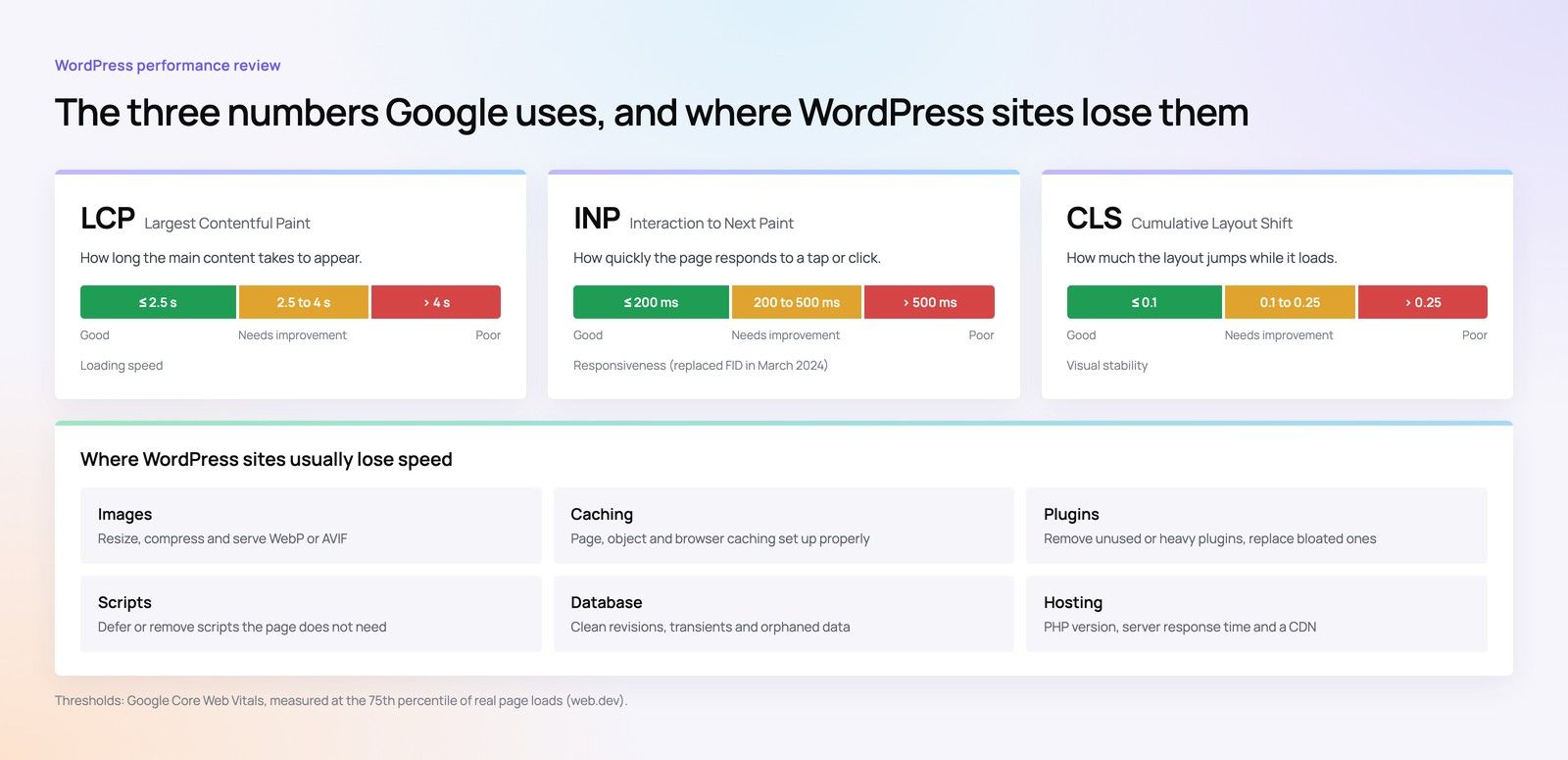
Before switching provider, separate hosting problems from code problems. The guide to matching Kubernetes, VPS or shared hosting to the workload covers the symptoms.
Putting a number on website downtime cost
Website downtime cost is rarely a single figure. It is better to estimate it for your own business using a simple worksheet, then compare that estimate with the difference between hosting options.
A five line worksheet
- Revenue or leads per hour. Take the enquiries or online orders that arrive through the site in a typical month and divide by the hours in that month. Use peak periods separately.
- Value per lead or order. Use your own conversion rate and average deal size from the CRM.
- Likely outage length. Ask the host what their typical time to restore is, not just their uptime commitment. Multiply by a realistic number of incidents a year.
- Recovery effort. Internal staff hours, agency hours and any emergency work after an incident.
- Reputational and contractual impact. Missed tender deadlines, investor announcements that could not be published, or service commitments to clients.
Hypothetical example: a Dubai engineering firm receives most of its tender enquiries through its website. The site goes down on a shared server for most of a working day during a regional bidding window. The sales director cannot count lost enquiries, but can value one missed tender, and that figure alone makes the case. The worksheet needs honesty, not precision.
When these figures sit alongside hosting quotes, the conversation changes from "why is this plan more expensive" to "which plan reduces the risk we can least afford". The same thinking feeds into a three year total cost of ownership for the website.
Breach risk and data protection duties
A compromised corporate site can leak form submissions, expose admin accounts or serve malware to visitors. If the site collects personal data, such as enquiry details, job applications or customer logins, a breach may also trigger obligations under data protection law.
The UAE's Federal Decree-Law No. 45 of 2021 on the Protection of Personal Data sets general duties on security and on reporting certain breaches. Companies in the DIFC or ADGM fall under those centres' own regimes, and some sectors such as health and banking have their own rules. The detail on reporting timelines and how the rules apply to your business should be confirmed with counsel or the relevant regulator, not taken from a hosting provider's marketing page.
Questions that expose security gaps
- How are customer accounts isolated from each other on the server?
- Who applies operating system and server software updates, and how quickly?
- Is there a web application firewall, and who manages its rules?
- Are access logs kept, for how long, and can you get them after an incident?
- Where, physically, are the servers and the backups?
If the site uses AI features, also ask where prompts and responses are processed; see the guide on AI governance for business websites covers that layer.
Writing a backup policy that actually works
A backup policy is the cheapest insurance a corporate site can have, and it is the area budget plans most often leave weak. The test is simple: could you restore the full site, including database and uploaded files, to a clean environment within a time the business would accept?
Five elements of a usable backup policy
- Frequency matched to change. A site whose content changes daily needs at least daily database backups; one with live transactions may need more.
- Separate location. At least one copy held away from the hosting account, so a compromise or account suspension cannot delete everything.
- Retention long enough to go back before an infection. Malware is often discovered weeks after it arrives.
- Named owner. One person or team responsible for checking backups run and for leading a restore.
- Tested restores. A restore rehearsal to a staging environment on a regular schedule, with the result written down.
Write down two targets as part of the policy: how much data you can afford to lose (recovery point) and how long the site can be offline (recovery time).
When managed hosting is worth considering
Managed hosting means the provider, or a technical partner, takes responsibility for the server layer: updates, monitoring, security hardening, backups and incident response. The extra spend is justified when the worksheet above shows a downtime or breach cost that clearly exceeds the difference.
| Situation | Budget shared hosting | Managed hosting or dedicated cloud |
|---|---|---|
| Small brochure site, few forms | Often acceptable with good backups | Optional |
| Corporate site with lead forms and careers portal | Risky | Usually justified |
| Listed company, investor relations content | Not advisable | Expected |
| Ecommerce or customer logins | Not advisable | Expected |
| Regulated sector data such as health or finance | Not advisable | Expected, with confirmed data location |
For how finance should treat the cost, see CapEx or OpEx for enterprise web projects.
Moving without breaking things
A hosting move carries its own risk: broken redirects, lost email records, missed scheduled tasks and search visibility dips. Treat it as a planned site migration with a checklist, a rollback point and a post launch check, not as a quick file copy.
Get an independent view of your hosting risk
If you are unsure whether your current hosting is a liability, start with evidence. Codeeo's website audit looks at how your site performs and where it is exposed, and our website development and Core Web Vitals teams can work with your chosen provider to set up a sound configuration. With 200+ projects delivered across the UAE and the US and an office in Dubai, the team can meet you in person to walk through the findings. Contact Codeeo to arrange a review.
Frequently asked questions
It can be, for a simple brochure site with little personal data and a tested backup held off the server.
Once the site carries lead forms, a careers portal, investor content or customer logins, the downtime and breach consequences usually outweigh the saving. The deciding factor is the business impact of an outage, not the size of the company.
Digital TransformationReplatforming From Drupal, AEM or .NET Without DowntimeWebsite replatforming from Drupal, AEM or .NET without downtime: choose the target platform, run delta content syncs, plan the cutover and test your rollback. Digital TransformationWhat a Good Enterprise Website SLA ContainsWhat a website maintenance SLA should contain, clause by clause: scope, severity tiers, response and resolution times, uptime, reporting, remedies and exit.
 Digital TransformationTreating Your Website as a Production System: The Case for an SLAWhy a business critical website needs an SLA: hypothetical incident costs, what changes with agreed response times, and how to make the case for support.
Tell us what the business needs. We will tell you what to build first.
Schedule a free consultation and get a written recommendation, with costs, before you commit to anything.
Get in touchPROVEN RESULTS
4.7 / 5verified reviews on Google