 E-CommerceGenerative AI in Online Retail: Uses That Pay BackGenerative AI ecommerce uses ranked by payback and risk: product descriptions, AI search and support assistants, plus Arabic quality checks for UAE stores.
Connecting WooCommerce to ERP, CRM and Shipping Without Duplicates
Plan a WooCommerce ERP integration that avoids duplicates: data ownership rules, idempotent order sync, CRM matching and UAE shipping, with Odoo and Dynamics.
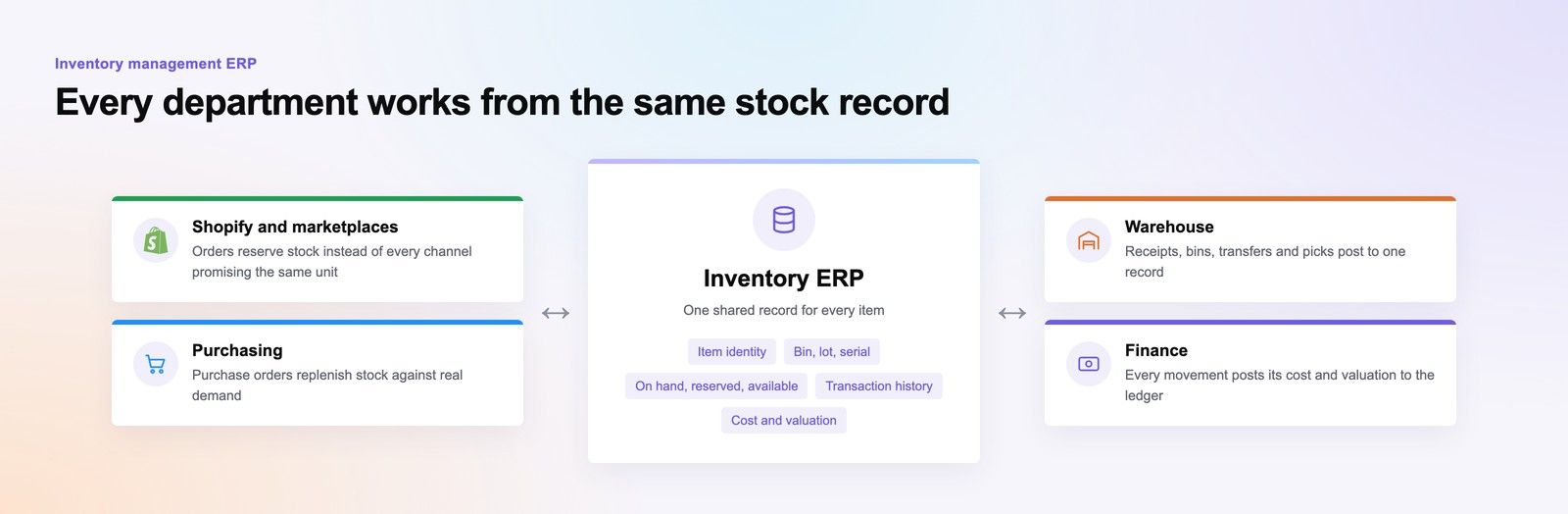
A WooCommerce ERP integration stays clean when every piece of data has one owner: one system decides products, one decides stock, one decides customers, and every other system only reads or reports back. Duplicate customers, phantom stock and orders posted twice almost always come from two systems believing they own the same record. Set the ownership rules first, then choose the sync pattern.
This guide covers how to write those rules for WooCommerce connected to an ERP, a CRM and shipping partners, with worked examples using Odoo and Microsoft Dynamics 365. It suits UAE merchants who already sell on WooCommerce and are tired of fixing records by hand.
Why WooCommerce integrations create duplicates
Most duplicate problems trace back to a few causes:
- No shared identifier. The store and the ERP each create their own ID for a customer or product, and nothing links them.
- Two way sync without rules. Both systems can edit the same field, so a change in one overwrites or duplicates the other.
- Retries without checks. A webhook fails, the connector retries, and the ERP receives the same order twice.
- Guest checkout. A customer buys as a guest, then registers, and the CRM now holds two contacts.
- Manual imports. Someone uploads a spreadsheet of products to fix a gap, creating new records instead of updating existing ones.
Each of these is a design problem, not a software bug, which means it can be prevented before go live.
Set data ownership rules for your WooCommerce ERP integration
Write a simple ownership table and get operations, finance and ecommerce to agree it. The table below is a common starting point for a merchant with an ERP, a CRM and a courier.
| Data | Owner (system of record) | WooCommerce role | Sync direction |
|---|---|---|---|
| Product SKU, cost, tax code | ERP | Read only | ERP to store |
| Product descriptions, images, SEO text | WooCommerce or a PIM | Owner | Store to ERP only if needed |
| Selling price and promotions | ERP for list price; store for web promotions | Shared by field | ERP to store for list price |
| Stock levels | ERP or warehouse system | Read only | ERP to store |
| Orders | WooCommerce at creation; ERP after acceptance | Creates, then reads status | Store to ERP, status back |
| Customer contact and marketing consent | CRM | Captures at checkout | Store to CRM, updates back by rule |
| Invoices and payments | ERP | Displays only | ERP to store |
| Shipment and tracking | Courier | Displays only | Courier to store |
Notice that ownership can be split by field, not just by record. Product descriptions often live in the store because the marketing team edits them, while cost and tax codes live in the ERP. What matters is that each field has exactly one owner.
Sync patterns that prevent duplicates
Use a stable external ID on every record
Store the ERP's product or customer ID in WooCommerce, and the WooCommerce order ID in the ERP. Matching on these IDs, not on names, means an update finds the right record instead of creating a new one. SKUs work well for products as long as they are unique and never reused.
Make every write idempotent
An idempotent write produces the same result whether it runs once or five times. Before creating an order in the ERP, the connector checks whether that WooCommerce order ID already exists. If it does, it updates rather than creates. This single rule removes most duplicate orders caused by retries.
Choose event driven or scheduled sync per data type
WooCommerce supports webhooks that fire on events such as order creation, and its REST API lets other systems read and update products, orders and customers. Use events for things that must move quickly, such as new orders, and scheduled jobs for bulk data such as nightly price updates. Stock usually needs frequent updates during trading hours so customers do not buy items that have already sold out.
Put a queue between systems
Sending data straight from one system to another fails when either side is slow or offline. A queue, or an integration layer, holds messages until the receiving system accepts them, retries failures in order and logs errors for someone to review. For merchants with several systems, this layer is where most of the integration logic should live.
Match customers carefully
For WooCommerce CRM sync, decide how customers are matched: usually by email, with phone number as a secondary check. Normalise phone numbers to one international format before matching, since UAE numbers are often entered in several ways. When a guest later registers, merge the records in the CRM rather than creating a second contact.
Example: WooCommerce and Odoo
A WooCommerce Odoo integration typically makes Odoo the owner of products, stock, pricing and accounting, with WooCommerce owning web content and creating orders.
- Products: created in Odoo with the SKU as the shared key, then pushed to WooCommerce. Web descriptions and images are added in WooCommerce and are not overwritten by later syncs.
- Stock: Odoo inventory is the single source; updates flow to WooCommerce on a short schedule or on stock moves.
- Orders: a WooCommerce webhook sends each new order to the integration layer, which checks for an existing order with that ID, then creates a sales order in Odoo.
- Status: when Odoo confirms delivery, the order status and tracking number flow back to WooCommerce.
On the technical side, Odoo provides an external API, and its newer JSON based API is replacing the older RPC endpoints. Check which API your Odoo version supports, and note that Odoo's documentation ties external API access to certain hosting and pricing plans, so confirm this before designing the integration. Third party connectors exist, but test them against your ownership rules before relying on them.
Example: WooCommerce and Microsoft Dynamics 365
With Dynamics 365, the pattern often splits between an ERP application such as Business Central for finance and operations, and Dynamics 365 Sales or Customer Service for CRM.
- ERP side: Business Central publishes an API for resources such as items, customers and sales orders. Orders from WooCommerce become sales orders, with the WooCommerce order number stored as an external reference so retries update rather than duplicate.
- CRM side: customer records and consent sit in Dynamics 365 Sales. WooCommerce captures details at checkout and passes them on; the CRM decides whether this is a new contact or an existing one.
- One customer identity: agree which Dynamics application creates the customer number, so the ERP and CRM do not each create their own.
Shipping integration in the UAE
Shipping integration UAE merchants need usually covers three steps: creating the shipment with the courier, printing labels, and bringing tracking back to the customer.
Decide which system books the courier
If the warehouse works from the ERP, book shipments from the ERP and send tracking to WooCommerce. If the store is the only system, a courier plugin in WooCommerce may be enough. Booking from both creates duplicate shipments, so pick one.
Handle addresses and cash on delivery
Many UAE addresses rely on area, building and landmark rather than postcode. Capture these as separate fields at checkout so the courier receives clean data. For cash on delivery, make the ERP the owner of payment reconciliation, using the courier's remittance reports, and update the order status in WooCommerce once cash is received.
Feed tracking back to the customer
Tracking updates should flow from the courier to the store, so customers see one status in their account and in emails. Avoid sending customers separate messages from the courier, the ERP and the store with different wording.
Order sync checklist before go live
- Ownership table agreed and signed off by operations, finance and ecommerce
- External IDs stored on products, customers and orders in every system
- Duplicate checks on every create operation
- Error log with alerts to a named person
- Test cases for retries, partial refunds, cancellations and returns
- Existing duplicate records cleaned before the first full sync
- Order storage settings confirmed; new WooCommerce installs use High Performance Order Storage, so connectors must support it
Hypothetical example: a Sharjah based beauty retailer finds three CRM contacts for many repeat customers. Investigation shows guest orders created contacts by phone number, while registered orders matched by email. Moving to email as the primary key, normalising phone numbers and merging existing records stops new duplicates appearing.
For the platform side of these decisions, see enterprise ecommerce platform selection and WooCommerce or Adobe Commerce for a growing catalogue. Once data is clean, it also supports better recommendations, covered in upsell and cross sell setups, and the wider view in ecommerce platforms compared.
Plan your integration with Codeeo
Codeeo works on both sides of these connections: WooCommerce development for the store, and Odoo and ERP and Microsoft Dynamics 365 and CRM for the business systems behind it, along with custom software where an integration layer is needed. With 200+ projects delivered and a Dubai office where UAE clients can meet the team in person, Codeeo can help you write the ownership rules and build the sync. Contact Codeeo to talk through your current setup.
Frequently asked questions
Not always.
Real time stock sync matters for fast selling items and limited releases, where overselling damages trust. For slower moving catalogues, frequent scheduled updates during trading hours are often enough and put less load on both systems. Many merchants combine the two: immediate updates when stock hits a low threshold, and scheduled updates otherwise.
E-CommerceGenerative AI in Online Retail: Uses That Pay BackGenerative AI ecommerce uses ranked by payback and risk: product descriptions, AI search and support assistants, plus Arabic quality checks for UAE stores. E-CommerceEnterprise Ecommerce Platform Selection: Requirements Before DemosChoose an enterprise ecommerce platform by setting integration, multi entity, data residency and order management requirements before any vendor demo starts.
 E-CommerceEcommerce Platforms Compared for UAE MerchantsAn ecommerce platform comparison for UAE merchants: Shopify, WooCommerce, Adobe Commerce, regional SaaS and headless matched to business size and sales channel.
Tell us what the business needs. We will tell you what to build first.
Schedule a free consultation and get a written recommendation, with costs, before you commit to anything.
Get in touchPROVEN RESULTS
4.7 / 5verified reviews on Google