 Digital TransformationReplatforming From Drupal, AEM or .NET Without DowntimeWebsite replatforming from Drupal, AEM or .NET without downtime: choose the target platform, run delta content syncs, plan the cutover and test your rollback.
CodeeoInsightsDigital Transformation
Enterprise Website Development Stages From Discovery to Launch
The enterprise website development process stage by stage: outputs and sign offs for discovery, design, build, migration, user acceptance testing and launch.

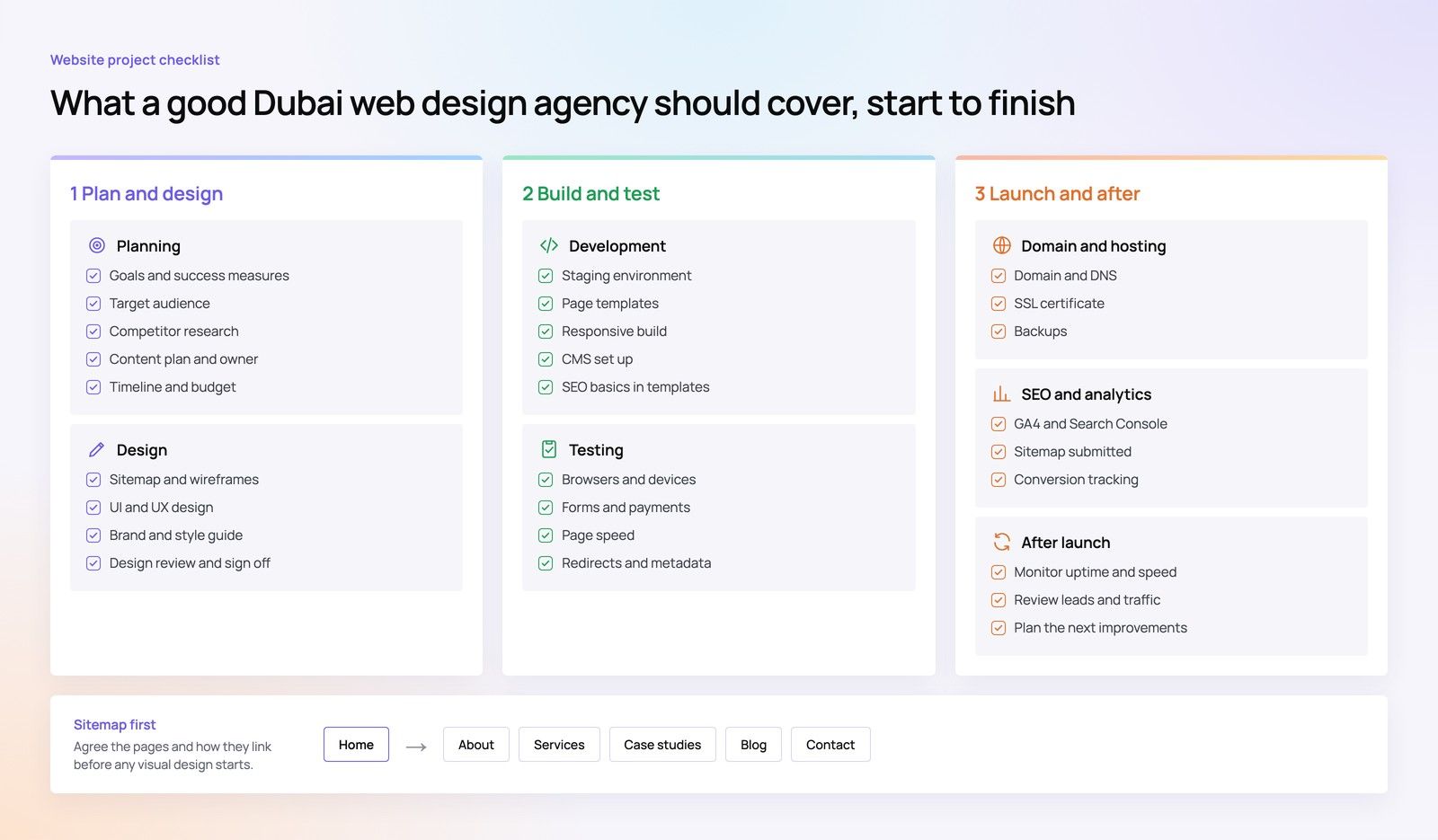
The enterprise website development process usually runs through seven stages: discovery, information architecture, design, build, content migration, testing with user acceptance, and launch. What makes it enterprise grade is not the number of stages but the gates between them, where named people sign off defined outputs before the next stage begins. This guide sets out what each stage should produce and who should approve it.
Why stage gates matter more than the stage names
Almost every agency describes a similar sequence. The difference between projects that land well and projects that drift is whether each stage closes properly. When a stage ends without a clear sign off, its open questions leak into the next one. Design starts before the sitemap is agreed, development starts before designs are approved, and testing becomes the place where every unresolved decision finally surfaces.
A stage gate is simple: a list of outputs, a named approver for each, and a rule that the next stage only begins when those outputs are accepted, or when the sponsor knowingly accepts the risk of starting early. The gates protect the client as much as the vendor, because they make scope visible and changes traceable.
Before any of this starts, the client side should be ready. See our guides on what to audit before a rebuild and running a web agency RFP in the UAE.
Stage 1: The discovery phase
The discovery phase turns the brief into a shared understanding of goals, audiences, constraints and scope. It is where the vendor tests assumptions rather than accepts them.
Typical activities
- Stakeholder interviews across marketing, IT, legal and business units.
- Review of audit findings: content, analytics, integrations, SEO and accessibility.
- Audience definition and the top tasks each audience needs to complete.
- Technical review of the current platform, hosting and integrations.
- Agreement on success measures and the baseline they will be compared against.
Outputs and sign off
Discovery should end with a written discovery report, a confirmed scope, a requirements list with priorities, a high level technical approach and an updated plan. The project owner and sponsor sign it off. If discovery reveals that the original scope or budget no longer fits, this is the cheapest moment to say so.
Stage 2: Information architecture and content strategy
Information architecture decides how the site is organised: its sections, navigation, page types and the relationship between languages. For bilingual UAE sites, it also settles how Arabic and English versions map to each other.
Outputs
- A sitemap showing every section and page type.
- Navigation structure for desktop and mobile.
- A content model listing each template and the fields it holds.
- A content plan: which pages are migrated, rewritten, merged or removed, and who owns each.
- A first draft of the redirect map from old URLs to new ones.
Sign off
The project owner approves the sitemap and navigation, with business unit leads confirming their sections. The content lead confirms the content plan and its deadlines, because migration and copywriting will run alongside design and build.
Stage 3: The design phase
The design phase usually runs in two steps. Wireframes settle layout and priority without visual styling. Visual design then applies the brand to key templates and builds a component library that the developers will use.
Wireframes and prototypes
Wireframes for the main templates, often turned into a clickable prototype, let stakeholders test the structure early. This is the right point for usability testing with real users, because changing a wireframe costs far less than changing a built page.
Visual design and design system
Visual design covers the homepage and a representative set of templates, rather than every page. The design system defines typography, colour, spacing, components and their states, including Arabic layouts that read right to left. Accessibility should be designed in here: contrast, focus states, form labels and heading structure, checked against the WCAG 2.2 level your organisation has chosen.
Outputs and sign off
Approved wireframes, approved visual designs for agreed templates, and a documented design system. The brand lead approves visual design within the decision rights agreed at the start. Limit review rounds per template, and consolidate feedback through the project owner so the designers receive one clear set of comments.
Stage 4: Development and integration
Development builds the templates, CMS configuration and integrations. On enterprise projects it usually runs in sprints, with working software demonstrated regularly rather than revealed at the end.
What gets built
- Front end templates and components from the design system.
- CMS setup: content types, roles, workflows and publishing permissions.
- Integrations with CRM, ERP, payment gateways, identity providers and other systems.
- Environments for development, staging and production, with a defined deployment process.
- Performance, security and analytics instrumentation built in from the start.
Performance as a build requirement
Set performance targets before development begins rather than testing for them at the end. Google's Core Web Vitals measure loading speed, responsiveness to input and visual stability, and they give the team clear measures to check on each template. Our Core Web Vitals service covers this work on existing sites.
Sign off
Each sprint ends with a demonstration. The project owner accepts completed features against the requirements list. The IT lead approves the architecture, environments and security approach before the build is considered complete.
Stage 5: Content migration and population
Content migration often runs in parallel with development once the CMS content types are stable. It is frequently underestimated, especially on sites with many years of pages and documents.
Approaches
| Approach | When it fits | Watch out for |
|---|---|---|
| Automated migration by script | Large volumes of structured content, such as news or product pages | Formatting errors and broken embedded links |
| Manual migration | Smaller volumes or content that needs rewriting | Effort and consistency across editors |
| Hybrid | Most enterprise sites | Clear rules on which content goes which way |
Outputs and sign off
All in scope content populated in staging, in every required language, with metadata, alt text and internal links checked. Each section owner confirms their content, and legal confirms regulated pages. Content that is not approved by the agreed date should not block launch unless it is essential; agree a fallback in advance.
Stage 6: Testing and user acceptance testing
Testing happens throughout the build, but this stage is where the whole site is checked together before launch. It has two layers: quality assurance by the vendor, and user acceptance testing by the client.
Quality assurance
- Functional testing of every template, form and integration.
- Cross browser and device testing, including the mobile devices your audiences use most.
- Accessibility testing with automated tools plus keyboard and screen reader checks.
- Performance testing against the targets set earlier.
- Security testing, including any penetration test your IT policy requires.
- SEO checks: titles, meta data, canonicals, hreflang, sitemaps and the redirect map.
User acceptance testing
User acceptance testing is where your own team confirms the site does what the business needs. Write test scripts based on real tasks, such as submitting an enquiry that should reach a specific CRM queue, or an editor publishing a page through the approval workflow. Log every issue with a severity rating and agree in advance which severities block launch.
Sign off
The project owner signs a UAT acceptance note once all blocking issues are fixed and retested. Non blocking issues move to a post launch list with owners and dates.
Stage 7: The launch plan and go live
A launch plan is a written, timed sequence for switching from the old site to the new one. It names who does what, in what order, and how to roll back if something fails.
What the launch plan covers
- Content freeze on the old site, and the date it starts.
- Final content sync and redirect implementation, using server side permanent redirects as recommended in Google's guidance on site moves with URL changes.
- DNS and hosting changes, with the people who hold access on call.
- Smoke tests on production: key pages, forms, payments, logins and analytics.
- Submission of updated XML sitemaps and monitoring of crawl and index reports.
- A rollback trigger and procedure, agreed before launch day.
- Internal and external communications: staff, customers and partners.
Choosing the launch window
Avoid launching just before public holidays, major campaigns or financial reporting dates, when the people needed to fix problems may be unavailable. A mid week launch with the full team present is usually safer than a weekend launch. For complex replatforms, see our guide to replatforming without downtime.
Sign off
The project owner and sponsor give a go or no go decision based on the UAT note, the launch checklist and the readiness of support teams.
After launch: hypercare and handover
The first weeks after launch need closer monitoring than normal support. Agree a hypercare period in which the vendor watches errors, broken links, form deliveries, search console reports and performance, and responds faster than under a standard support agreement.
Handover should include documentation, admin training, access transfer and a post launch review comparing results with the baseline set in discovery. Our article on enterprise website timelines explains how to plan this period into the overall schedule.
The enterprise website development process at a glance
| Stage | Key output | Typical approver |
|---|---|---|
| Discovery | Discovery report and confirmed scope | Project owner and sponsor |
| Information architecture | Sitemap, content model, redirect map draft | Project owner and section owners |
| Design | Wireframes, visual designs, design system | Brand lead |
| Development | Working templates, CMS and integrations | Project owner and IT lead |
| Content migration | Populated staging site in all languages | Section owners and legal |
| Testing and UAT | UAT acceptance note | Project owner |
| Launch | Go or no go decision and live site | Project owner and sponsor |
Hypothetical example: a holding company's design stage is approved by the brand lead, but a business unit head sees the designs for the first time during UAT and asks for a different layout. Because the decision log shows the approved design and who signed it, the request is handled as a change with its time impact shown, and the sponsor decides to schedule it after launch rather than delay go live.
Many failed projects can be traced back to a stage that closed without a real sign off. Our article on why enterprise redesigns fail before launch looks at those failure points in detail.
Work through every stage with one team
Codeeo has delivered more than 200 projects across the UAE and the US, with a team of 80+ across Dubai, Riyadh and Karachi. For enterprise websites the team covers website design and development, UI/UX design, site migration and the CRM, ERP and custom systems a corporate site connects to. With an office in Dubai, UAE stakeholders can meet the team in person at each stage gate. Contact Codeeo to plan your next website project.
Frequently asked questions
Yes, and on large projects they usually do.
Content migration often runs alongside development, and design for later templates can continue while early templates are being built. The rule is that each piece of work should only start once its own inputs are approved. Overlap is a planning choice made with the sponsor's knowledge, not a way of skipping sign offs that were not ready.
Digital TransformationReplatforming From Drupal, AEM or .NET Without DowntimeWebsite replatforming from Drupal, AEM or .NET without downtime: choose the target platform, run delta content syncs, plan the cutover and test your rollback. Digital TransformationWhat a Good Enterprise Website SLA ContainsWhat a website maintenance SLA should contain, clause by clause: scope, severity tiers, response and resolution times, uptime, reporting, remedies and exit.
 Digital TransformationTreating Your Website as a Production System: The Case for an SLAWhy a business critical website needs an SLA: hypothetical incident costs, what changes with agreed response times, and how to make the case for support.
Tell us what the business needs. We will tell you what to build first.
Schedule a free consultation and get a written recommendation, with costs, before you commit to anything.
Get in touchPROVEN RESULTS
4.7 / 5verified reviews on Google