 SEORecovering Traffic After a Failed Website MigrationSEO recovery after migration in the right order: diagnose the traffic drop, fix redirects, rebuild internal links, request reindexing, then report progress.
Redesigning Without Losing Rankings: A Phase by Phase Checklist
Website redesign SEO checklist for same domain rebuilds: baseline, redirect mapping, launch tests in Search Console and 90 days of post launch SEO, with owners.
A website redesign SEO checklist protects rankings by giving every risky task a phase and an owner: what to record before design starts, what to build into the new site, what to test on launch day and what to watch for the next 90 days. Most redesigns that lose traffic on the same domain do so because URLs, content or crawl settings changed without anyone checking the effect. The checklist below is written for teams keeping their domain and rebuilding the site on it.
If you are also changing domain or moving platform, the scope is wider, because signals have to transfer from one site to another. This article stays with same domain redesigns, where the domain is constant but templates, navigation, content and often URLs change.
Why same domain redesigns still lose rankings
Keeping the domain removes one risk, not all of them. Search engines rank individual pages, and a redesign can change almost everything about those pages at once. The usual causes of a drop are predictable:
- Changed URLs without redirects. A new information architecture often renames sections, and old addresses start returning 404 errors.
- Removed or thinned content. Designers trim copy to make layouts cleaner, and pages that ranked for detailed queries lose the text that made them relevant.
- Lost internal links. A simplified menu or footer can cut the links that told search engines which pages mattered most.
- Crawl blocks carried to production. A staging robots.txt rule or noindex tag goes live with the new build.
- Template level changes. Title tags, headings, canonical tags and structured data are rebuilt from scratch and some are lost.
- Slower pages. Heavier imagery, animation and scripts make the new design look better but load worse, especially on mobile.
None of these are hard to prevent, but they are easy to miss when nobody owns them.
Who owns what
Smaller teams combine roles, but naming them helps.
| Role | Responsible for |
|---|---|
| SEO lead | Baseline data, URL inventory, redirect map, content parity and post launch monitoring |
| Developer | Redirect rules, templates, robots.txt, sitemaps, performance and tracking code |
| Content owner | Approving copy changes, page merges and removals |
| Project manager | Sign off at each gate, launch timing and the rollback decision |
| Marketing or analytics lead | Analytics, conversion events, ad landing pages and reporting |
Phase 1: Before design starts
This is the phase most teams skip. The goal is a clear picture of what the current site earns from search, so nothing valuable is removed by accident.
Capture a baseline (owner: SEO lead)
- Export at least 12 months of Search Console performance data by page and by query, so seasonal patterns are visible later.
- Export organic landing page data and conversions from analytics.
- Record the current indexed page count and any existing coverage errors, so old problems are not blamed on the redesign.
- Note average Core Web Vitals and page speed for key templates.
- List the pages that bring organic leads or sales, not only traffic. These become your protected pages.
Build a full URL inventory (owner: SEO lead with developer)
Crawl the live site and combine the crawl with URLs from the XML sitemap, Search Console, analytics and backlink data. Crawls alone miss orphan pages, old campaign URLs and linked PDFs. The inventory should include every URL that returns a page today, with its traffic, links and conversions beside it.
Set content rules for the new design (owner: content owner)
Agree before wireframes are drawn that protected pages keep their core content, headings and topic focus. Designers can change layout as needed, but removing a section of copy from a ranking page should need sign off from the SEO lead. Write this into the project brief.
Decide whether URLs will change
The safest redesign keeps every URL. If URLs must change, decide now, so the redirect map is built alongside design rather than in the last week.
Phase 2: During design and build
This phase turns the inventory into decisions and builds them into the new site. It is where the redirect mapping work happens.
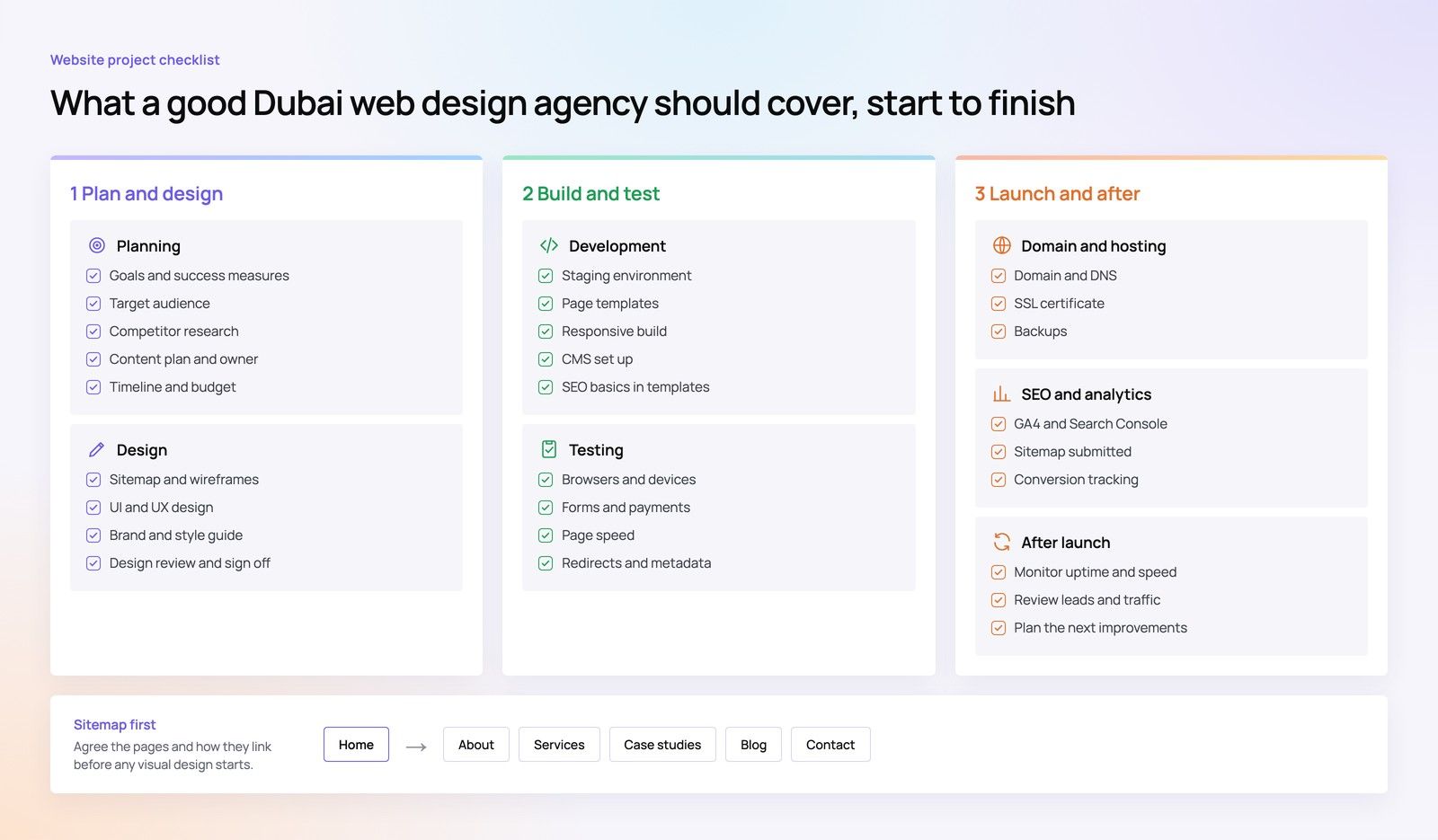
Redirect mapping (owner: SEO lead, built by developer)
Every old URL that changes needs a decision: keep, redirect to an equivalent page, merge into a related page, or retire. Google's guidance on site moves with URL changes recommends permanent server side redirects, sending each old URL directly to its final destination and avoiding sending many old URLs to one irrelevant page such as the home page.
- Map one to one wherever an equivalent page exists.
- Where pages are merged, redirect each one to the page that now covers its topic.
- Avoid chains. If an older redirect already points to a URL that is now changing, update the original rule to point straight to the new address.
- Include URLs with parameters, trailing slash variations, uppercase versions and old file extensions if they receive traffic or links.
- Only let a page return a 404 or 410 when there is genuinely no relevant replacement and nothing of value points to it.
Keep the map in a spreadsheet with columns for old URL, new URL, rule type, owner and test result. That one file becomes your launch test plan.
Template SEO elements (owner: developer)
- Title tags and meta descriptions carried over or rewritten deliberately, never left as defaults.
- One clear main heading per page, with heading structure that matches the content.
- Self referencing canonical tags on indexable pages, pointing to the live domain, not staging.
- Structured data rebuilt for templates that had it, such as articles, products, FAQs or local business details.
- Image alt text kept or improved during content migration.
- Hreflang annotations preserved if the site has Arabic and English versions.
Internal linking and navigation (owner: SEO lead with designer)
Compare the planned menu, footer and in content links with the current ones. Protected pages should be no deeper in the click path than they are now. If a service page currently sits in the main menu and brings enquiries, removing it from navigation can weaken it even if its URL and copy are unchanged.
Performance budget (owner: developer)
Set limits for page weight, scripts and image sizes before the build is complete, and test key templates on mobile connections. Retrofitting speed after launch costs more.
Staging protection (owner: developer)
Keep the staging site out of search results using password protection or noindex, and record exactly how it is blocked. That note is what tells the launch team what to remove.
Phase 3: Launch
Launch day should be a run through of tests that were prepared in advance, not a time for decisions. A separate guide covers the final pre launch migration audit in detail; the essentials are below.
Before switching over (owner: project manager)
- Confirm content parity on protected pages against the baseline list.
- Crawl the staging site and fix broken links, missing titles and accidental noindex tags.
- Agree a launch window with low traffic and enough people available for a few hours afterwards. For many UAE businesses that means avoiding the start of the working week or a campaign launch.
- Agree in writing what would trigger a rollback, and who decides.
In the first hours (owner: developer and SEO lead)
- Remove staging blocks. Google's guidance specifically warns to remove noindex tags or robots.txt rules that were only needed during development.
- Test the redirect map in bulk with a crawler or script, checking status codes and final destinations.
- Check robots.txt, the XML sitemap and canonical tags on the live domain.
- Use URL Inspection in Search Console on a sample of protected pages to confirm Google can fetch and render them.
- Submit the updated XML sitemap in Search Console.
- Confirm analytics tags, conversion events and forms are firing on the live site.
What not to use
The Change of Address tool in Search Console is for moves between domains or subdomains. Google's documentation states it does not apply to path changes within the same domain, so it is not part of a same domain redesign.
Phase 4: Post launch SEO for the first 90 days
Post launch SEO is where most of the real problems show up, because search engines need time to recrawl the site. Google notes that rankings can fluctuate temporarily while pages are recrawled, and that on medium sized sites the switch can take a few weeks or more, with larger sites taking longer. Plan for monitoring, not a single check.
Week 1 (owner: SEO lead)
- Check Search Console daily for spikes in 404 errors, server errors and pages excluded by noindex.
- Review server logs, if available, for Googlebot errors and redirect loops.
- Compare organic sessions and conversions to the same weekday before launch, not to the overall monthly average.
- Fix any missing redirects discovered from 404 reports straight away.
Weeks 2 to 6 (owner: SEO lead with content owner)
- Track the protected pages individually. A total traffic number can hide a drop on the three pages that bring most enquiries.
- Watch the indexed page count in the Page indexing report. Expect old URLs to fall out as new ones are indexed.
- Where a protected page has dropped, compare old and new versions side by side: copy, headings, internal links and load speed.
- Check Core Web Vitals reports once enough field data has built up.
Weeks 7 to 12 (owner: SEO lead and project manager)
- Compare the 90 day period with the baseline, adjusting for seasonality using last year's data.
- Document what changed, what was fixed and what remains open.
- Keep redirects in place. Google advises keeping them for at least one year, and longer is safer because links and bookmarks keep pointing to old addresses.
- Agree the handover from project team to ongoing SEO, so monitoring does not stop when the project closes.
If traffic has not recovered by this stage, a structured investigation helps. Our guide to recovering traffic after a failed migration sets out how to find the cause, and the data that matters is covered in using SEO data to guide decisions.
How to redesign without losing SEO when URLs must change
Some redesigns change many URLs, for example when a flat site is reorganised into service and industry sections. That is manageable if the extra risk is handled deliberately.
Hypothetical example: a Dubai professional services firm moves from addresses such as /accounting-services to /services/accounting/. Every service, location and blog URL changes. The team maps each old URL to its new equivalent, finds that two thin location pages should be merged into one stronger page, and redirects both to it. They test the full map on staging using a hosts file override, launch on a quiet day, and check 404 reports daily for two weeks. A handful of old campaign URLs with query strings were missed; because the team was watching, they were redirected within days instead of months.
A compact website redesign SEO checklist
| Phase | Task | Owner |
|---|---|---|
| Before | Export 12 months of search and analytics data; list protected pages | SEO lead |
| Before | Build URL inventory from crawl, sitemap, Search Console and backlinks | SEO lead |
| Before | Write content rules into the design brief | Content owner |
| During | Complete and review the redirect map | SEO lead |
| During | Rebuild titles, headings, canonicals, structured data and hreflang | Developer |
| During | Check navigation depth and internal links to protected pages | SEO lead |
| During | Set and test a performance budget | Developer |
| Launch | Remove staging blocks; test redirects; submit sitemap | Developer |
| Launch | Confirm tracking, forms and conversion events | Analytics lead |
| 90 days | Monitor errors, protected pages and indexing; fix gaps | SEO lead |
| 90 days | Report against baseline; hand over to ongoing SEO | Project manager |
Rankings are not the only thing a redesign can break. Forms, ad landing pages and CRM connections often fail while search traffic looks normal, which is covered in protecting lead flow during a redesign.
Planning a redesign with search in mind
Codeeo builds websites and handles site migrations with search protection planned from the first workshop, not added at the end. The team has delivered 200+ projects across the UAE and the US, and UAE clients can meet the team at the Dubai office to walk through the plan.
- Website design and development with SEO requirements built into templates.
- Site migration support, including redirect mapping and launch testing.
- A technical SEO review of the current site to set your baseline before work begins.
- Digital marketing and SEO for the monitoring period after launch.
If a redesign is on your roadmap, talk to the Codeeo team about the scope and the checks it will need.
Frequently asked questions
Yes, for a short period.
Agree a cut off date after which changes to the old site are logged and copied to the new one, ideally in the final two to three weeks before launch. Without it, the content team keeps editing the live site while the new site is built from an older export, and recent updates quietly disappear at launch.
SEORecovering Traffic After a Failed Website MigrationSEO recovery after migration in the right order: diagnose the traffic drop, fix redirects, rebuild internal links, request reindexing, then report progress. SEOPlanning an Enterprise Rebuild That Keeps SEO, UX and GovernancePlan an enterprise website rebuild that protects rankings, user tasks and content governance, with one shared inventory, phase gates and agreed launch criteria.
 SEOProtecting Lead Flow During a Redesign, Not Only RankingsAvoid a website redesign conversion drop: map lead paths, rebuild form tracking, protect ad landing pages and test CRM integration before and after launch day.
Tell us what the business needs. We will tell you what to build first.
Schedule a free consultation and get a written recommendation, with costs, before you commit to anything.
Get in touchPROVEN RESULTS
4.7 / 5verified reviews on Google