 SEORecovering Traffic After a Failed Website MigrationSEO recovery after migration in the right order: diagnose the traffic drop, fix redirects, rebuild internal links, request reindexing, then report progress.
SEO for Large WordPress Sites: Scale Problems and Fixes
Enterprise WordPress SEO fixes for taxonomy bloat, archive duplication, faceted URLs, sitemaps and schema conflicts, plus the editorial rules that keep them.

Enterprise WordPress SEO is less about choosing the right plugin and more about controlling what thousands of pages, editors and archives produce over time. On a large site, small defaults multiply: every tag creates an archive, every filter creates a URL and every editor can publish a duplicate. The fixes below combine technical settings with the governance that keeps them in place.
A five page brochure site rarely shows these problems. A news publisher, a university, a property portal or a WooCommerce catalogue with thousands of entries will, usually a year or two after launch, when traffic flattens even though publishing never slowed down.
Why enterprise WordPress SEO behaves differently
WordPress SEO at scale starts from one fact: WordPress generates URLs generously. A single post can appear on its own URL, in category and tag archives, in author and date archives, in paginated lists and in feeds. On a small site that is harmless. On a site with tens of thousands of posts, it means search engines spend much of their crawling on thin listing pages while new content waits to be discovered.
Scale also changes who touches the site. Several teams, agencies and plugins all make decisions that affect SEO, often without seeing each other's work. Most of the problems below are not bugs. They are the result of nobody owning a decision.
Taxonomy bloat: when tags outgrow content
Taxonomy bloat happens when categories and tags multiply faster than the content that fills them. Editors add a new tag for every story, near duplicates appear ("UAE", "U.A.E.", "United Arab Emirates") and hundreds of archives end up holding one or two posts each.
How to spot it
- Export all terms with their post counts. A long tail of terms with one or two posts is the clearest sign.
- Look for terms that differ only in spelling, plural or language.
- Check Search Console for tag archives that receive impressions but no clicks, or that are reported as crawled but not indexed.
How to fix it
- Agree a controlled vocabulary: a short list of categories that map to real topics, and tags only where they help navigation.
- Merge duplicate terms and redirect the retired archive URLs to the surviving term.
- Decide which archives deserve to rank. Strong category pages can be improved with an introduction and curated links; thin tag archives can be set to noindex or removed.
- Make creating new terms an editor task, enforced through role and capability settings where your setup allows, so authors pick from the list instead of inventing new ones.
Archive duplication and thin listing pages
Beyond tags, WordPress offers author, date and attachment archives. On a site with a single author, the author archive repeats the blog index. Date archives rarely match how anyone searches.
Attachment pages are a special case. The WordPress core team explains in its note on attachment page changes that WordPress 6.4 added an option to control them: new installs have attachment pages turned off and redirect to the file, while sites upgraded from older versions keep them on. Older enterprise sites can therefore carry thousands of thin image pages. Check the setting and redirect or remove them if they are not needed.
Pagination
Large archives paginate. Google states in its pagination guidance that it no longer uses rel next and prev, and that paginated pages should not all point their canonical at page one. Give each page its own URL and canonical, keep links to individual posts crawlable and avoid relying only on infinite scroll.
Faceted URLs and internal search
Faceted URLs appear wherever visitors can filter: WooCommerce shops, property listings, job boards and directories. Each combination of filters can create a new URL, and the number of combinations grows very quickly.
Google's guide to managing faceted navigation suggests blocking filter URLs in robots.txt when they do not need to be indexed, using the standard ampersand separator for parameters, keeping filter order consistent and returning a 404 for empty or nonsensical combinations. It describes rel canonical as a less effective long term control than robots.txt for this purpose.
A practical split
| URL type | Usual treatment |
|---|---|
| Main category or listing page | Indexable, in the sitemap, linked from navigation |
| High demand filter (for example a city or property type) | Turn into a proper landing page with its own clean URL and copy |
| Other filter and sort combinations | Blocked from crawling or kept out of the index |
| Internal search results | Not crawled, not in the sitemap |
Hypothetical example: a Dubai property portal on WordPress lets visitors filter by community, bedrooms, price band and furnishing. Search Console shows Googlebot crawling hundreds of thousands of filter URLs while new listings take days to appear. The team creates static landing pages for the most searched community and bedroom combinations, blocks the remaining parameters and links the new pages from the main navigation.
Sitemaps on large WordPress sites
Since WordPress 5.5, core generates XML sitemaps at wp-sitemap.xml. The WordPress core announcement explains that each sitemap holds up to 2,000 entries by default, that public post types, public taxonomies, author archives and the home page are included, and that filters can remove specific post types, taxonomies or the user sitemap. SEO plugins often replace the core sitemap with their own.
At scale, the rule is simple: the sitemap should list only URLs you want indexed. Remove tag archives you have set to noindex, author archives on single author sites and any custom post types that exist only for internal use. Confirm that only one sitemap system is active, so search engines are not given two different lists.
Performance problems that grow with the site
Large WordPress sites accumulate plugins, tracking scripts and page builder markup. Each addition is small; together they slow templates down, and slow templates hurt both users and crawling.
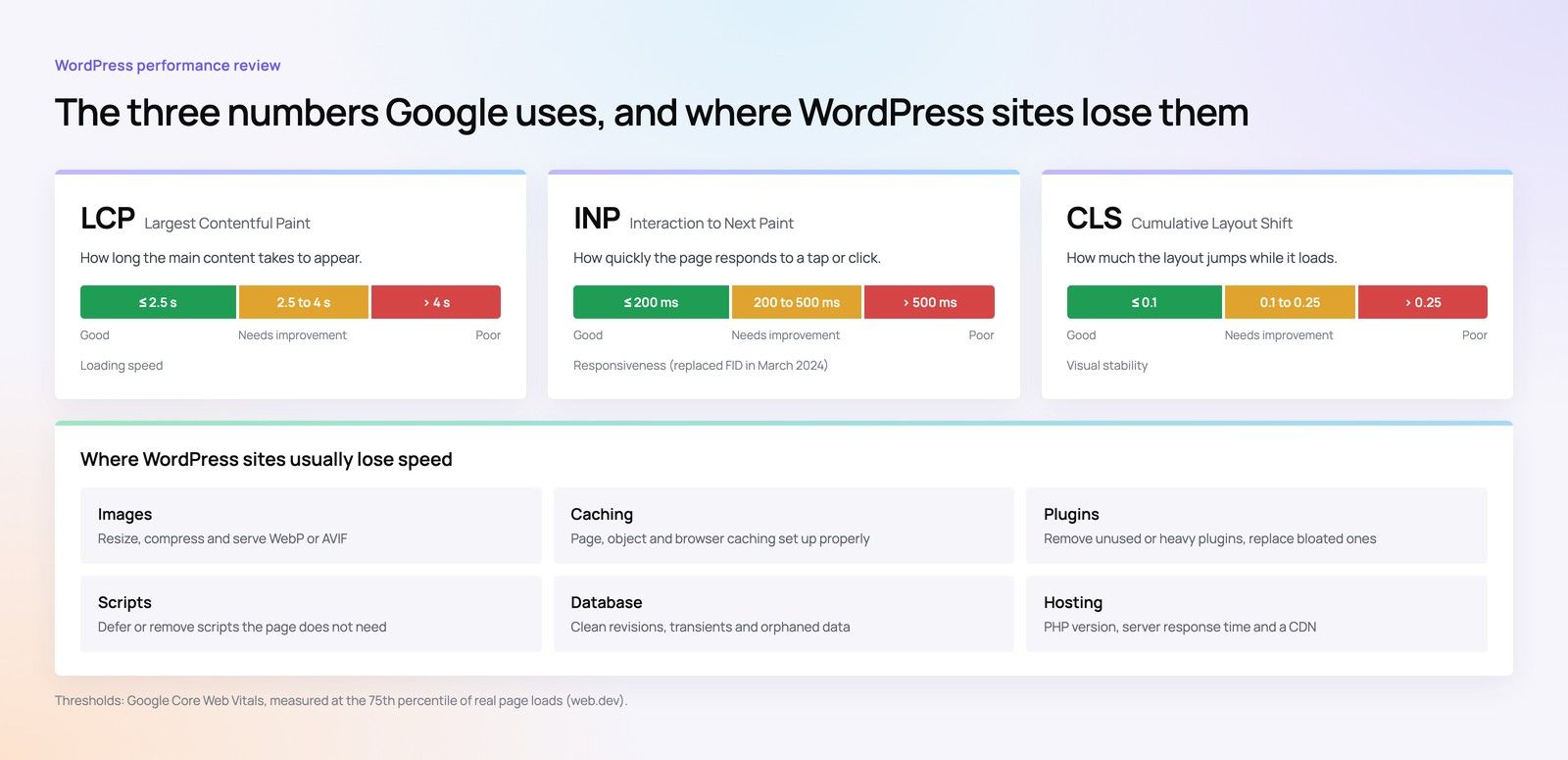
- Audit plugins every quarter and remove those that duplicate features or are no longer used.
- Measure by template, not by single URL. One slow article template affects every article.
- Use object caching and a CDN for high traffic estates, and watch database queries on archive pages.
- Set image sizes and lazy loading rules centrally, rather than relying on editors.
WordPress structured data across many templates
WordPress structured data is usually output by the theme, an SEO plugin and sometimes by other plugins at the same time. On large sites this produces conflicting markup: two Organisation blocks, an Article type on a product page or breadcrumbs that do not match the visible trail.
Choose one system to own schema, switch off output from the others and map each template to its types: Article for posts, BreadcrumbList site wide, Product for WooCommerce items and Organisation once. Validate a sample from every template after each plugin update, because updates can quietly change output.
Editorial governance: the fix that keeps working
Technical clean ups decay without rules for the people who publish. Most large WordPress estates in the UAE have several content owners, and some publish in English and Arabic. The governance that holds up usually includes:
- A publishing checklist covering title, meta description, slug, category, featured image and alt text.
- Role based permissions so only editors can create terms, change slugs or alter templates.
- A redirect process for every deleted or renamed page, with a named owner.
- A content inventory reviewed twice a year to merge, update or retire weak posts.
- Change control for plugins and theme updates, tested on staging first.
- Clear language rules for bilingual sites, so English and Arabic versions link to each other correctly.
When these rules are written into the development brief, developers can build guard rails into the admin. See our guide to technical SEO requirements for a development brief for how to phrase them.
Bring a large WordPress estate back under control
Codeeo builds and maintains WordPress sites and offers SEO services, from technical audits to ongoing work. The team of 80+ across Dubai, Riyadh and Karachi has delivered 200+ projects across the UAE and the US, and UAE clients can meet the team in person at the Dubai office.
See our WordPress development services, book a technical SEO review or look at Core Web Vitals optimisation. If you are choosing who should run the work, read how to judge an enterprise SEO agency in Dubai. Large WooCommerce catalogues face similar issues to those in Shopify Plus SEO for large catalogues. To talk through your site, get in touch with Codeeo.
Frequently asked questions
Not automatically.
Some tag archives attract real searches and can become useful hub pages if they hold enough posts and carry a short introduction. The better approach is to review terms by post count and search demand, improve the few that deserve to rank, merge near duplicates and noindex or retire the rest. Blanket rules tend to remove pages that were bringing in visitors.
SEORecovering Traffic After a Failed Website MigrationSEO recovery after migration in the right order: diagnose the traffic drop, fix redirects, rebuild internal links, request reindexing, then report progress. SEOPlanning an Enterprise Rebuild That Keeps SEO, UX and GovernancePlan an enterprise website rebuild that protects rankings, user tasks and content governance, with one shared inventory, phase gates and agreed launch criteria.
 SEOProtecting Lead Flow During a Redesign, Not Only RankingsAvoid a website redesign conversion drop: map lead paths, rebuild form tracking, protect ad landing pages and test CRM integration before and after launch day.
Tell us what the business needs. We will tell you what to build first.
Schedule a free consultation and get a written recommendation, with costs, before you commit to anything.
Get in touchPROVEN RESULTS
4.7 / 5verified reviews on Google