 Web DevelopmentWordPress VIP or Self Hosted Enterprise WordPress in the UAEWordPress VIP or self hosted enterprise WordPress in the UAE: compare data residency, hosting SLA, cost drivers and code review rules, plus key setup notes.
WordPress Release Management: Staging, QA and Rollback
A WordPress deployment workflow that releases safely: Git based builds, a staging site that mirrors live, smoke tests to run and a rollback plan written first.

A safe WordPress deployment workflow moves every change through the same route: code in version control, a staging site that mirrors production, a short set of smoke tests, and a rollback plan written before anyone touches the live site. Having a staging site is only half the job. The other half is a repeatable release routine that tells your team what to check, who signs off and how to undo a bad release quickly.
The routine below suits marketing sites, publishers and WooCommerce stores alike.
What a WordPress deployment workflow has to protect
WordPress releases are awkward because a site is two things at once: code (themes, plugins, configuration) and data (posts, pages, orders, form entries, settings stored in the database). Code moves forwards from development to production. Content moves the other way, because editors keep publishing on the live site while developers work.
A good workflow respects that split:
- Code is promoted. It travels from a developer's machine to staging to production, always from the same Git branch.
- Data is copied down, never pushed up. Staging gets a recent copy of the production database for testing. Pushing a staging database over production would wipe out orders and posts created since the copy was taken.
- Configuration is per environment. API keys, payment gateway modes, email sending and caching differ between staging and live, and should be set by environment rather than edited by hand on release day.
WordPress has a built in way to tell code which environment it is running in. The WP_ENVIRONMENT_TYPE setting returns values such as staging or production through the wp_get_environment_type function, so a theme or plugin can, for example, block search engines or switch a payment gateway to test mode outside production.
Set up the pipeline before the first release
1. Put the right things in Git
WordPress git deployment works best when the repository holds what your team writes or controls: the custom theme, custom plugins, must use plugins and a dependency file listing third party plugins and their versions. Keep uploads, cache folders and environment secrets out of the repository. That way any commit can be rebuilt into the same site, and the history shows who changed what and when.
2. Make WordPress staging match production
Staging should run the same PHP version, the same web server and caching layers, the same plugin versions and a recent copy of the live database. When staging differs from production, tests pass on staging and fail on the live site. Check these points before trusting staging:
- PHP and database versions match the live server.
- Page caching and any CDN rules behave the same way, or the differences are written down.
- Outgoing email is captured or disabled, so test orders and form tests do not reach customers.
- Search engines are blocked and the site sits behind a login.
- Personal data in the copied database is masked where your privacy obligations require it.
3. Automate the deploy step
Copying files over SFTP by hand is where releases go wrong: a file is forgotten, an old version is uploaded, or the upload stops halfway. Use a deploy tool or a CI job that builds from a tagged commit and replaces the code in one step. Many teams use WP-CLI inside that job, because it can export the database, update plugins and run checks from the command line in a way that is easy to script and repeat.
The release routine, step by step
Use the same sequence for every release, however small. Small releases are the ones teams skip steps on, and they still break sites.
| Stage | What happens | Who owns it |
|---|---|---|
| Prepare | Changes merged to the release branch, release notes written, rollback plan agreed | Lead developer |
| Deploy to staging | Tagged build deployed to staging with a fresh database copy | Developer or CI job |
| QA on staging | Smoke tests plus checks specific to this release | QA or a nominated tester |
| Sign off | Business owner confirms key user flows and content | Site owner or marketing lead |
| Back up | Database export and code reference taken from production | Developer |
| Deploy to production | Same tagged build deployed, caches cleared | Developer or CI job |
| Verify | Smoke tests repeated on the live site, monitoring watched | Developer and tester |
Choose the release window
Release when traffic is low and the people who can fix problems are available. For many UAE businesses that means avoiding the hours when campaigns are running or orders peak, and never releasing just before a weekend or public holiday when the team is away.
Freeze content during the deploy
If the release includes database changes, such as new custom fields or a plugin that migrates its settings, ask editors to stop publishing for the short deploy window. Otherwise their changes can collide with the migration.
Smoke tests that catch most broken releases
Smoke tests are a short list of checks that prove the site still does its core jobs. They are not a full regression test; they are the checks you can run in a few minutes on staging and again on production. Write them down once and reuse them.
A starter smoke test list
- The home page, a typical inner page and a blog post load without errors or layout breaks, on desktop and on a phone.
- Main navigation and footer links work.
- Each enquiry form submits and the notification reaches the right inbox or CRM.
- Site search returns results.
- For stores: a product page loads, an item can be added to the basket, and a test order completes in the payment gateway's test mode on staging.
- Logged in editors can open, edit and preview a post.
- The admin Site Health screen shows no new critical issues.
- Tracking tags still fire on key pages.
- The PHP error log shows no new fatal errors or warnings.
Add checks for the specific change
Every release also needs checks that relate to what changed. A plugin update gets a test of the feature that plugin provides. A theme change gets a visual comparison of the templates it touches. A multilingual change gets a check of language switching and translated menus.
Check performance, not only function
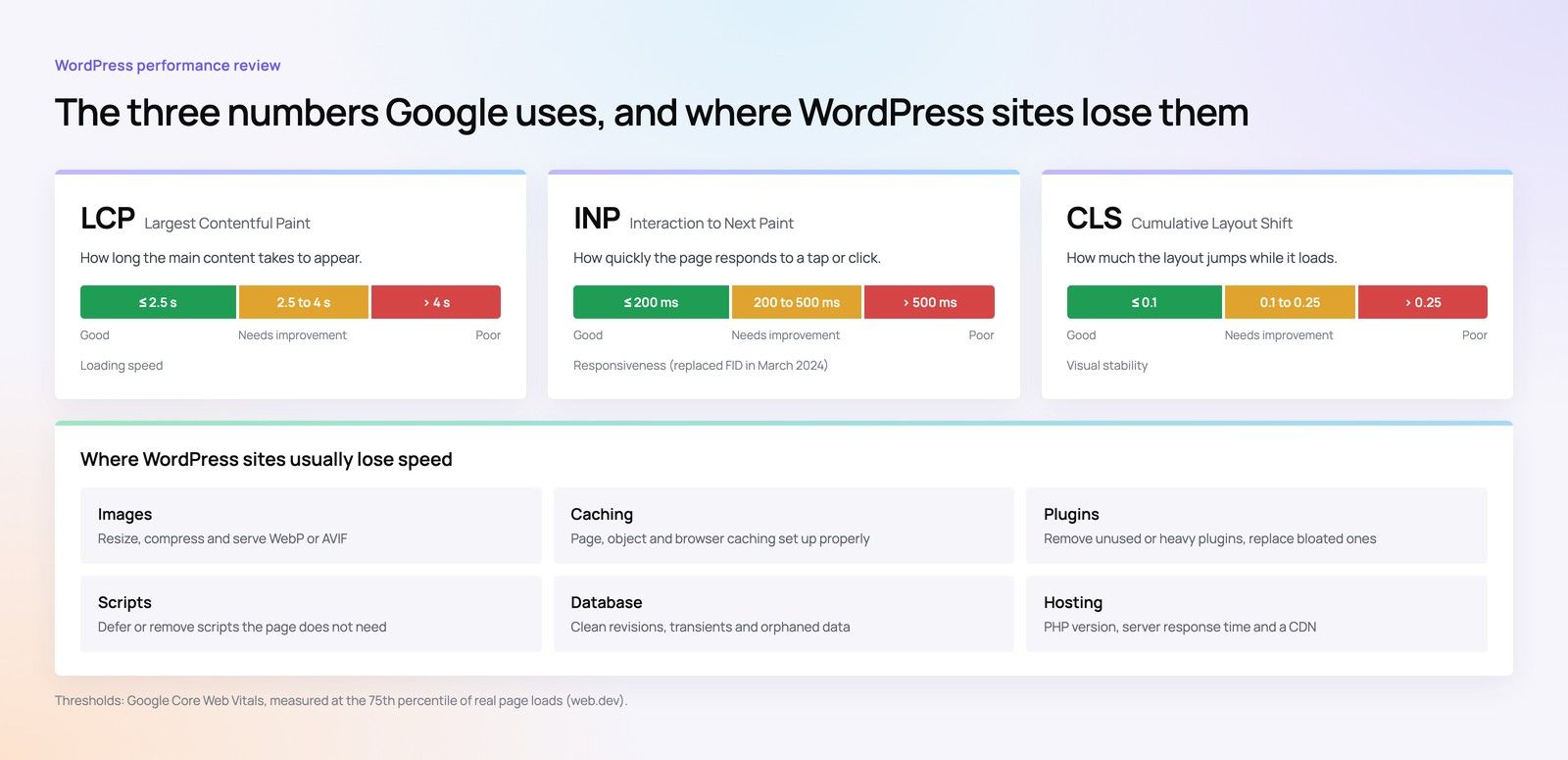
A release can work perfectly and still slow the site down, for example when a new plugin loads heavy scripts on every page. Compare key pages before and after on staging, and look at Core Web Vitals once real visitor data comes in after the production release.
Write the rollback plan before you release
A rollback plan answers one question in advance: if the release breaks something important, what exactly do we do, and who decides? Writing it on release day, under pressure, is how a ten minute problem turns into an afternoon of downtime.
Decide the rollback trigger
Agree in advance which failures mean an immediate rollback and which can be fixed forward. A broken checkout, failing forms or a white screen on key pages usually justify rolling back. A misaligned button on one template can wait for a quick fix. Name the person who makes the call.
Code rollback
If deploys are built from tagged commits, rolling back code means redeploying the previous tag. This is fast and predictable, which is the main reason to deploy from Git rather than by hand. Keep the previous build available so the redeploy does not depend on rebuilding anything.
Database rollback
Database rollback is harder. Restoring the pre release export will remove any orders, form entries or comments created since it was taken. Options, from least to most disruptive:
- Design releases so new code can run against the old database structure, which makes code rollback enough on its own.
- Write a reverse step for each database change, tested on staging.
- Restore the backup only as a last resort, and export any new orders or entries first so they can be re entered.
Plugin and core updates
For third party plugins, keep the previous version's files so it can be reinstated quickly, and pin versions in your dependency file. Some plugins change their database tables on update and cannot simply be downgraded, so read the changelog before updating anything significant.
Hypothetical example: a Dubai retailer updates its WooCommerce payment plugin. Smoke tests on staging pass, but after release the live checkout shows an error for one card type. The rollback plan says checkout failures trigger an immediate rollback, so the developer redeploys the previous tag, which restores the old plugin version, and the store is trading normally again while the team investigates on staging.
Governance that keeps releases boring
A few habits keep releases uneventful:
- No direct edits on production. Disable the theme and plugin file editors and limit who can install plugins, so every change goes through Git. Our guide to WordPress admin roles, approvals and MFA covers how to set those permissions.
- A plugin register. Know which plugins are installed, why, and who owns them. See WordPress plugin governance for a lean approach.
- Release notes. A few lines per release describing what changed and how to test it. They make rollback decisions faster and help whoever is on call.
- Agreed responsibilities. If an agency or support partner runs releases, the support agreement should say who deploys, when, and how quickly a rollback happens. Our article on what a WordPress maintenance SLA should cover lists the points to include.
Headless WordPress builds add another layer, because the front end deploys separately from the CMS. If that is your setup, headless WordPress preview and editorial workflow explains how preview and publishing fit alongside releases.
Need a safer way to release WordPress changes?
Codeeo's WordPress development team builds and maintains WordPress sites for UAE businesses, including Git based workflows, staging environments and release routines like the one above. If your current setup involves manual uploads or an outdated staging copy, a website audit is a sensible first step, and if you are moving hosts at the same time our site migration service covers that move. Codeeo has delivered 200+ projects across the UAE and the US, and our Dubai office means you can meet the team in person. Get in touch to talk through your release process.
Frequently asked questions
It is tempting, but small updates still break sites, especially when one plugin depends on another or changes its database tables.
A practical compromise is to batch minor updates into a regular weekly or fortnightly release that goes through staging, and keep emergency security patches as the only exception. Even then, take a backup and run the smoke tests on production straight after the update.
Web DevelopmentWordPress VIP or Self Hosted Enterprise WordPress in the UAEWordPress VIP or self hosted enterprise WordPress in the UAE: compare data residency, hosting SLA, cost drivers and code review rules, plus key setup notes. Web DevelopmentWhat a WordPress Maintenance SLA Should CoverWhat WordPress maintenance services should cover in writing: core and plugin updates, security, backups, multilingual publishing support and response times.
 Web DevelopmentOne Security Checklist for WordPress, Django and Strapi SitesWebsite security checklist for organisations running WordPress, Django and Strapi: admin access, secrets, updates, APIs, data and recovery side by side.
Tell us what the business needs. We will tell you what to build first.
Schedule a free consultation and get a written recommendation, with costs, before you commit to anything.
Get in touchPROVEN RESULTS
4.7 / 5verified reviews on Google