 Web DevelopmentWordPress VIP or Self Hosted Enterprise WordPress in the UAEWordPress VIP or self hosted enterprise WordPress in the UAE: compare data residency, hosting SLA, cost drivers and code review rules, plus key setup notes.
When Headless Is Overkill: The Case for Hybrid WordPress
Hybrid WordPress keeps a normal theme and decouples only the sections that need it. See the patterns, a planning method and when full headless is overkill.

Hybrid WordPress keeps a normal WordPress theme for most of the site and decouples only the sections that genuinely need an application style front end, such as a property search, a product configurator or a member dashboard. It gives teams much of the speed and interactivity they want from headless without rebuilding every page, plugin and editing workflow. For many UAE businesses it is the sensible middle ground between a traditional site and full decoupling.
Why full headless is often overkill
Fully decoupled WordPress means the theme is retired, WordPress becomes a content store, and a separate front end, often built with Next.js, renders every page. That architecture is powerful, but it moves a lot of work onto developers.
What you give up when you go fully headless
- Theme level features: page layouts, menus, widgets and template logic must be rebuilt in the new front end.
- Plugin output on the public site: SEO, forms, multilingual, bookings and caching plugins that render HTML no longer do so directly.
- Simple preview: editors need a purpose built preview connection to see drafts on the live design.
- One system to host: there are now two applications, two deployment pipelines and two sets of updates.
Those costs make sense for organisations publishing to apps and several channels, or running very large, highly interactive sites. They are headless overkill for a company whose real problem is three slow, complex sections on an otherwise ordinary marketing site.
Signs you are in hybrid territory
- Most pages are content pages that marketing edits often.
- One or two features feel like an app: filtering, calculators, portals or real time data.
- The team relies on WordPress plugins it does not want to replace.
- Developer capacity after launch is limited.
How the hybrid WordPress pattern works
In a hybrid build, WordPress still renders pages through its theme. Selected parts of the site are handled differently, reading data from WordPress or other systems through APIs. There are three common ways to do it.
1. Interactive islands inside theme pages
The page is rendered by the theme, and a JavaScript component mounts into one area of it, such as a listings filter or a quote calculator. The component fetches data from the WordPress REST API or a custom endpoint, so only that area behaves like an app. Since WordPress 6.5, the Interactivity API also offers a standard way to add interactive behaviour to blocks without a separate framework.
2. Decoupled sections on their own path
A section such as /search/ or /portal/ is served by a separate front end application, while the rest of the domain stays on the theme. Routing is handled at the web server, CDN or hosting level. This suits large features with their own logic, such as a customer area that also talks to a CRM or ERP.
3. Shared content, separate channel
The website stays traditional, while a mobile app or partner portal reads the same content from WordPress through the API. Editors manage everything in one place, but only the new channel is decoupled.
| Pattern | Best for | Main trade off |
|---|---|---|
| Interactive islands | Filters, calculators, live availability | Must manage JavaScript weight carefully |
| Decoupled sections | Portals, large search, account areas | Two applications to deploy and keep consistent in design |
| Shared content, new channel | Apps or kiosks reusing website content | API design and caching need planning |
| Full headless (for comparison) | Many channels, large interactive products | Every page and plugin feature rebuilt |
Making the traditional part fast first
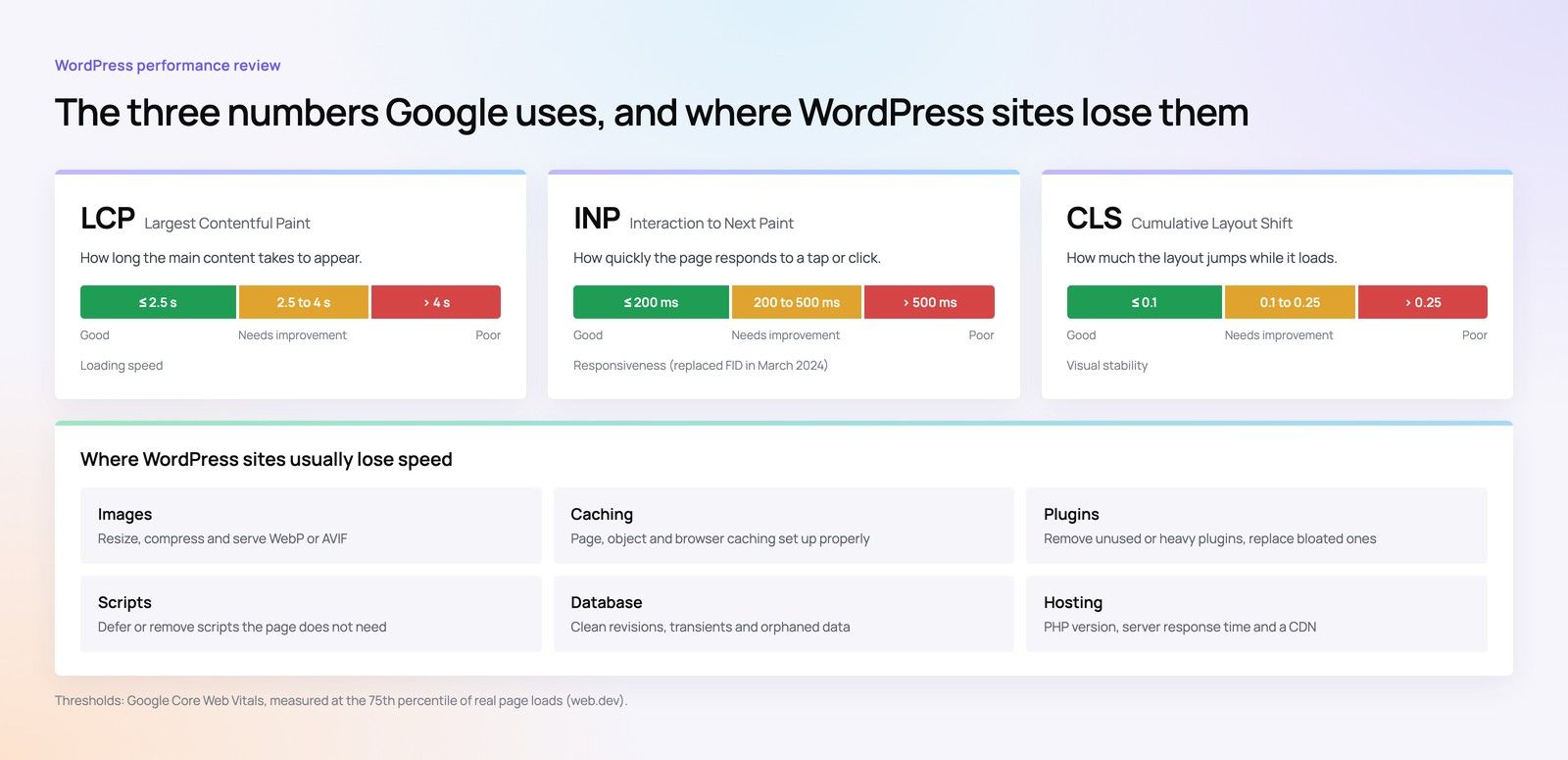
Many teams consider decoupled WordPress because the current site is slow. Before decoupling anything, check whether the theme itself is the problem. A large share of WordPress performance issues come from heavy page builders, too many plugins, unoptimised images and weak hosting, all of which can be fixed without changing architecture.
Block themes as the modern base
Block themes, introduced with full site editing in WordPress 5.9, build templates from blocks and a central theme.json file for styles. Compared with older themes wrapped in a page builder, a lean block theme usually loads less code and gives editors controlled flexibility through patterns and locked layouts. It is a strong foundation for the traditional part of a hybrid site.
Performance checklist before decoupling
- Measure Core Web Vitals in field data, not only lab tests: Largest Contentful Paint, Interaction to Next Paint and Cumulative Layout Shift.
- Audit plugins and remove those that load scripts on every page.
- Serve correctly sized, modern format images with explicit dimensions.
- Use full page caching and a CDN, and review hosting capacity.
- Replace heavy page builder layouts on key templates with native blocks.
If the site meets its performance goals after this work, the remaining case for decoupling is usually limited to one or two features, which is exactly where hybrid fits.
Planning a hybrid build
Step 1: map every section by need
List each part of the site and mark it as content, light interactivity or application. Only the application rows are candidates for decoupling.
Step 2: design the API layer
The WordPress REST API covers posts, pages and custom post types. For complex queries, a custom endpoint or a GraphQL plugin can return exactly what the front end needs. Plan authentication for anything private, and caching for anything public.
Step 3: share the design system
The decoupled sections must look and behave like the theme. Share design tokens, typography, spacing and components so visitors cannot tell where WordPress ends and the app begins. Bilingual sites need right to left support in both parts.
Step 4: protect SEO
Decoupled sections still need crawlable URLs, server rendered or pre rendered content where it matters for search, correct titles, canonical tags and inclusion in the sitemap. Islands that only render content in the browser should not hold text you need indexed.
Step 5: agree ownership
Decide who maintains each part after launch, how releases are coordinated and how errors are monitored. Hybrid reduces work compared with full headless, but it is still two kinds of code.
Hypothetical example: a Dubai property brokerage has a WordPress site with area guides, news and team pages, plus a listings search that is slow and hard to use. A hybrid plan keeps the block theme for content, rebuilds search as a decoupled section reading from the listings feed, and keeps enquiry forms and the CRM connection in WordPress. Editors work as before, and only the search team needs JavaScript framework skills.
Common mistakes in hybrid projects
- Decoupling for fashion: rebuilding a section as an app when a lean block and a little JavaScript would have done the job.
- Loading a framework everywhere: shipping a large JavaScript bundle on every page just to power one widget, which undoes the speed gains.
- Two diverging designs: letting the theme and the decoupled section drift apart in styling, buttons and navigation.
- No owner for the API: changing a custom post type or field in WordPress without checking what the front end expects, which breaks the decoupled section silently.
- Forgetting analytics: app style sections often change content without a page load, so tracking events must be set up deliberately.
Each of these is avoidable with a short architecture document that lists every decoupled part, the endpoints it uses and who is responsible for it.
Hybrid vs full headless: a quick comparison
| Question | Hybrid WordPress | Full headless |
|---|---|---|
| Editing experience | Familiar for most pages | Structured fields and custom preview |
| Plugin compatibility | Retained for theme pages | Largely lost on the front end |
| Build effort | Focused on chosen sections | Every template and feature |
| Ongoing skills | WordPress plus some front end | Full front end, platform and DevOps |
| Multichannel readiness | Partial, through the API | Designed for it |
Hybrid is also a reversible step. If more channels appear later, a well designed API layer and content model make a move to full headless easier. For that path, see the guide to headless WordPress with Next.js and the headless or traditional WordPress decision guide. Teams weighing a different back end can compare WordPress and Strapi for multiple channels, and the overview of CMS options puts all of these in context.
Getting the architecture right with Codeeo
Codeeo builds traditional, hybrid and headless sites through its WordPress development and Next.js development services, and improves existing sites through Core Web Vitals work. A good first step is a speed optimisation review to see how much of the problem the theme itself is causing. With 200+ projects delivered and an office in Dubai where clients can meet the team, Codeeo can map your sections and recommend the lightest architecture that meets your goals. Contact Codeeo to discuss your site.
Frequently asked questions
Not quite.
Decoupled WordPress usually means the whole front end is separate from WordPress. Hybrid keeps the theme rendering most pages and decouples only selected sections or channels. The terms are sometimes used loosely, so ask any developer to explain exactly which pages the theme will render and which a separate application will handle.
Web DevelopmentWordPress VIP or Self Hosted Enterprise WordPress in the UAEWordPress VIP or self hosted enterprise WordPress in the UAE: compare data residency, hosting SLA, cost drivers and code review rules, plus key setup notes. Web DevelopmentWhat a WordPress Maintenance SLA Should CoverWhat WordPress maintenance services should cover in writing: core and plugin updates, security, backups, multilingual publishing support and response times.
 Web DevelopmentWordPress Release Management: Staging, QA and RollbackA WordPress deployment workflow that releases safely: Git based builds, a staging site that mirrors live, smoke tests to run and a rollback plan written first.
Tell us what the business needs. We will tell you what to build first.
Schedule a free consultation and get a written recommendation, with costs, before you commit to anything.
Get in touchPROVEN RESULTS
4.7 / 5verified reviews on Google