 Web DevelopmentWordPress VIP or Self Hosted Enterprise WordPress in the UAEWordPress VIP or self hosted enterprise WordPress in the UAE: compare data residency, hosting SLA, cost drivers and code review rules, plus key setup notes.
Fast Yet Interactive: 3D, Video and Configurators Without Lag
Interactive website performance without lag: a load budget for 3D product viewers, background video and configurators that keeps your Core Web Vitals healthy.
Interactive website performance comes down to one rule: nothing heavy should load before the visitor asks for it or can see it. 3D product viewers, background video and configurators can all sit on a fast page if each one has a load budget, a lightweight placeholder and a clear trigger for loading the real thing. Without that discipline, a single impressive feature can push the whole page past acceptable Core Web Vitals.
This guide gives a practical budget for each heavy element, written for product, industrial and engineering brands that want to show what they make without making buyers wait.
What interactive website performance is measured against
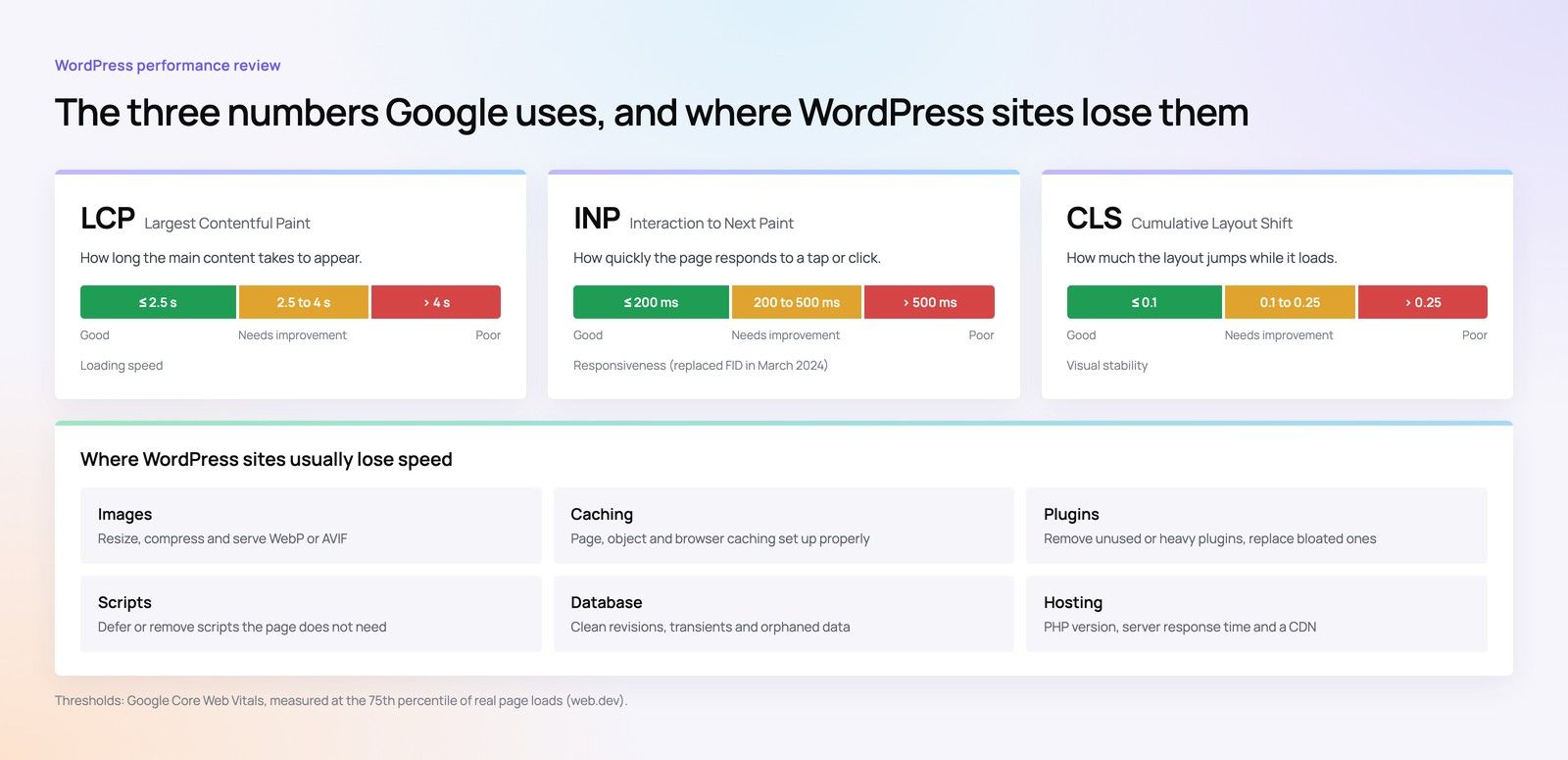
Google's Core Web Vitals give a shared yardstick. According to web.dev's Core Web Vitals guidance, a good experience means:
| Metric | What it measures | Good threshold | How heavy features hurt it |
|---|---|---|---|
| Largest Contentful Paint (LCP) | Loading: when the main content appears | 2.5 seconds or less | Large video or 3D files compete for bandwidth with the hero |
| Interaction to Next Paint (INP) | Responsiveness to clicks and taps | 200 milliseconds or less | Heavy JavaScript blocks the main thread while it parses and runs |
| Cumulative Layout Shift (CLS) | Visual stability | 0.1 or less | Players and viewers that appear without reserved space push content down |
These are assessed at the 75th percentile of real page loads, split by mobile and desktop. In practice that means your slower visitors on mid range phones set the score, not the fast laptop in the meeting room.
The load budget principle
A load budget is an agreed limit on what a feature may cost before and after interaction. For each heavy element, set three things in the project brief:
- Initial cost: what loads with the page. This should usually be only a placeholder image and reserved space.
- Trigger: what causes the real feature to load, such as a click, a tap or scrolling near it.
- Interaction cost: the size and processing time of the full feature once triggered, tested on a mid range phone.
Agree these numbers with your developers for your own audience and devices, then check them in testing before launch. Our guide to building a performance budget into development explains how to set and enforce budgets across a whole project.
3D product viewer budget
A 3D product viewer lets buyers rotate a valve, a machine or a fitting and see it from every angle. It is also one of the heaviest things a page can load: a rendering library plus the model files and textures.
Rules for a 3D viewer
- Load a poster image first. Show a high quality still render in the viewer's space, with a clear "View in 3D" button.
- Load the library and model only on interaction, or when the viewer scrolls close to the screen if it sits well below the fold.
- Optimise the model. Engineering CAD exports are far too detailed for the web. Reduce polygon counts, compress textures and remove internal parts nobody will see.
- Never make the 3D viewer the LCP element. The hero should be an image or text that loads quickly.
- Reserve space with fixed dimensions or an aspect ratio, so the page does not shift when the viewer appears.
Hypothetical example: a pump manufacturer adds 3D models to twenty product pages. In the first build, every page loads the viewer library and full model at once, and mobile LCP slips badly. After switching to a poster with a "View in 3D" button and simplified models, the page loads as quickly as a standard product page, and only visitors who want the model download it.
Website video performance budget
Background and hero video is popular with industrial brands because it shows plants, fabrication and installation in motion. It is also a common cause of slow LCP.
Background or hero video
- Use a poster image that represents the video and can serve as the LCP element.
- Keep clips short and compressed, with no audio track for silent background loops, and serve a smaller file to mobile.
- Autoplay only when muted. According to web.dev's video lazy loading guide, autoplay generally requires the muted attribute, and playsinline is needed for autoplay on iOS.
- Consider whether mobile needs the video at all. A still image often communicates the same thing on a small screen.
Video below the fold
- Set preload to none so the browser does not fetch video data until needed; the same guide notes this is the most reliable way to stop early downloads.
- Load and play when the video scrolls into view, using an observer script, and keep controls available as a fallback.
- Replace animated GIFs with short video files, which are usually much smaller for similar quality.
Embedded YouTube or Vimeo players
Third party players load substantial scripts even if nobody presses play. Use a facade: a static thumbnail with a play button that loads the real player only when clicked. Chrome's Lighthouse documentation describes facades as static stand ins that load the real embed on interaction. Iframes below the fold can also use the native loading="lazy" attribute.
Product configurator budget
A product configurator lets buyers choose options such as size, material, finish or accessories and see the result, sometimes with live pricing on request or a generated specification. Configurators hurt INP more than LCP, because every selection can trigger heavy recalculation and redrawing.
Rules for a configurator
- Put the configurator on its own page or behind a clear "Configure" step, rather than loading it on every product page.
- Load option data in stages. Fetch the first step's options immediately and later steps as the user reaches them.
- Keep each interaction light. Update only the parts of the screen that change, and move heavy calculations off the main thread or to the server.
- Use pre rendered images for common combinations instead of live 3D where that is enough to support the decision.
- Give instant feedback. Show the selection change immediately, even if a summary or image takes a moment longer.
Lazy loading and other techniques that apply to every feature
Lazy loading is the most useful single technique, but it is easy to misuse.
- Do lazy load images, iframes, viewers and video below the fold.
- Do not lazy load the LCP element. The hero image or poster should load immediately and can be given high fetch priority.
- Reserve space for everything that loads later, using width and height or aspect ratio, to protect CLS.
- Split JavaScript so each heavy library is only downloaded on pages and at moments where it is used.
- Audit third party scripts such as chat widgets, analytics and tag managers; they often cost more than the features you added on purpose.
Testing before and after launch
Lab tools are useful during development, but the real test is field data from your visitors.
- Test on a mid range Android phone over a mobile connection, not only on office Wi Fi.
- Run lab tests on key templates: home, product, configurator and project pages.
- After launch, monitor field data for each template, especially mobile.
- Re test every time a heavy feature, script or video is added.
The choice of build also affects how much room you have for heavy features; our comparison of static and dynamic websites covers this. If you are planning the wider site for an industrial brand, see structuring an industrial or engineering company website, and for budgeting, website cost by project type.
Keep your interactive features fast with Codeeo
Codeeo builds product and industrial websites where 3D, video and configurators load only when they earn their place. Our Core Web Vitals team audits and fixes existing pages, our website development and Next.js developers build new features to an agreed load budget, and our speed optimisation quick start is a focused way to find the biggest wins first.
Our team of 80+ works from Dubai, Riyadh and Karachi, and UAE clients can meet us in person at our Dubai office. Speak to Codeeo about making your interactive pages fast.
Frequently asked questions
Each has trade offs.
Self hosted video gives full control over file size, posters and loading, with no third party scripts, but needs good compression and ideally a CDN. YouTube or Vimeo handle encoding and streaming, but their players are heavy, so they should sit behind a facade. Many sites self host short background loops and use a platform for longer explainer videos.
Web DevelopmentWordPress VIP or Self Hosted Enterprise WordPress in the UAEWordPress VIP or self hosted enterprise WordPress in the UAE: compare data residency, hosting SLA, cost drivers and code review rules, plus key setup notes. Web DevelopmentWhat a WordPress Maintenance SLA Should CoverWhat WordPress maintenance services should cover in writing: core and plugin updates, security, backups, multilingual publishing support and response times.
 Web DevelopmentWordPress Release Management: Staging, QA and RollbackA WordPress deployment workflow that releases safely: Git based builds, a staging site that mirrors live, smoke tests to run and a rollback plan written first.
Tell us what the business needs. We will tell you what to build first.
Schedule a free consultation and get a written recommendation, with costs, before you commit to anything.
Get in touchPROVEN RESULTS
4.7 / 5verified reviews on Google