 Web DevelopmentWordPress VIP or Self Hosted Enterprise WordPress in the UAEWordPress VIP or self hosted enterprise WordPress in the UAE: compare data residency, hosting SLA, cost drivers and code review rules, plus key setup notes.
Building Speed In During Development, Not After Launch
How to write a website performance budget into your brief, covering Core Web Vitals, page weight and third party scripts, and enforce it during every sprint.
A website performance budget is a set of agreed limits, such as maximum page weight, number of scripts and target loading times, that a new site must stay within while it is being built. Writing it into the brief and checking it every sprint is far cheaper than speeding up a slow site after launch, because the decisions that make sites heavy are made during design and development, not afterwards.
This guide is for the person setting requirements: the marketing manager, product owner or IT lead commissioning a new site. It covers what to put in the budget, how to word it in a brief, and how to enforce it as the build progresses. If your site is already live and slow, the companion guide on fixing a slow website in the right order is the better starting point.
Why a website performance budget belongs in the brief
Speed is usually lost through many small, reasonable decisions. A larger hero video here, a chat widget there, a second analytics tool, an animation library for one page, a font with six weights. None of them breaks the site alone. Together they push it past the point where visitors on a phone wait for content.
Without a budget, nobody owns the total. Designers add what looks good, marketing adds the tools it needs, developers implement what is approved, and the cost appears at launch when it is hardest to reverse. A budget gives every request a price in performance terms, so trade offs happen during the project instead of after it.
What to include in a performance budget
Google's web.dev guidance on performance budgets describes three broad kinds of limit: quantity based limits such as page weight or number of requests, milestone timings that measure the visitor's experience, and rule based scores from tools such as Lighthouse. A practical brief uses some of each.
User experience targets: Core Web Vitals
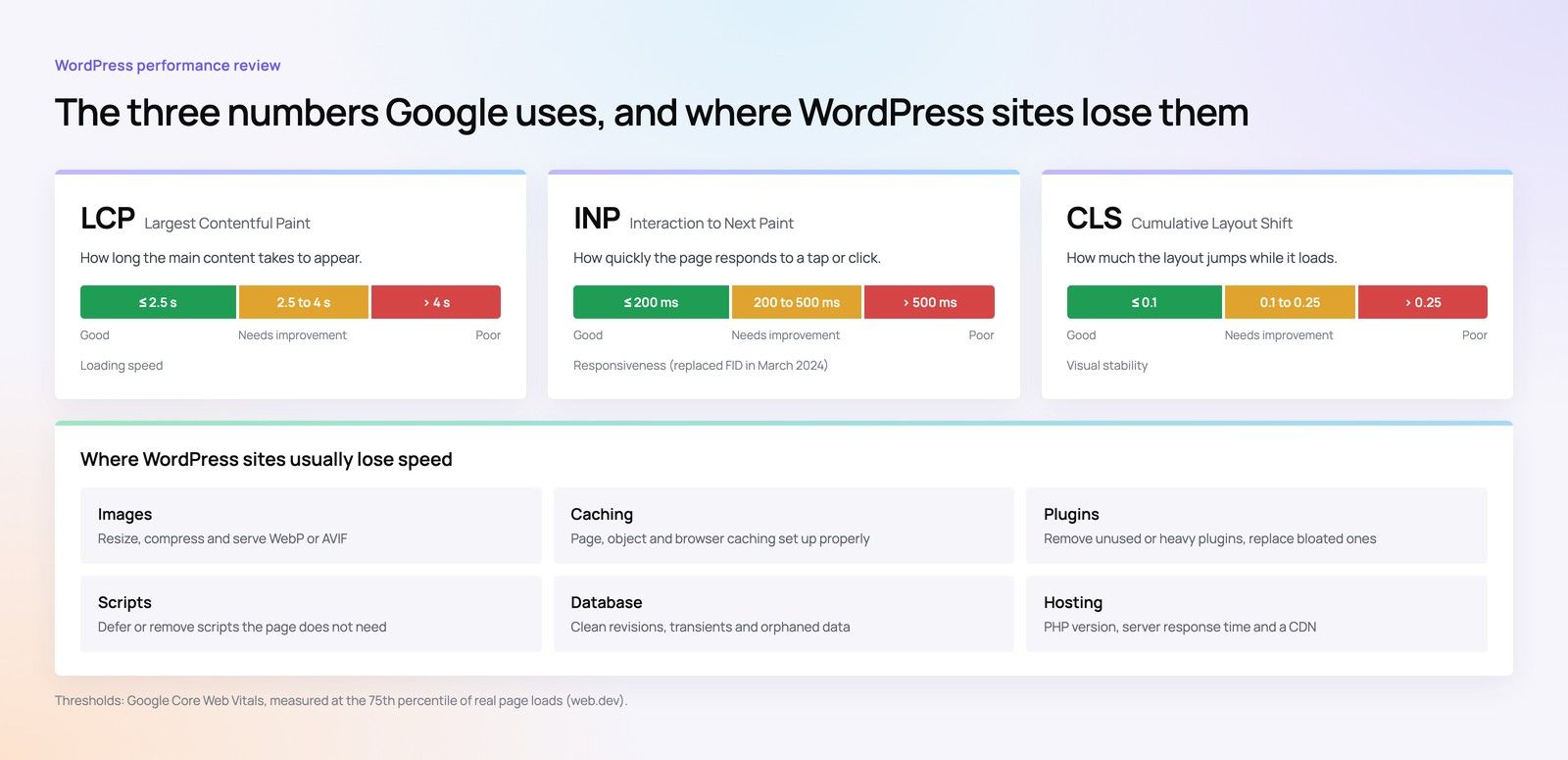
Core Web Vitals are Google's measures of loading, responsiveness and visual stability. According to Google Search Central, good thresholds are:
- Largest Contentful Paint (LCP): within 2.5 seconds.
- Interaction to Next Paint (INP): under 200 milliseconds. INP replaced First Input Delay as a Core Web Vital in March 2024, so older briefs that mention FID need updating.
- Cumulative Layout Shift (CLS): under 0.1.
These are the targets the finished site should meet for real visitors. They are outcomes, though, and hard to check in the middle of a sprint, which is why the budget also needs limits developers can measure on every build.
Quantity limits developers can check on every build
- Total page weight for key templates such as the home page, a service page and a product page.
- JavaScript size, the item that most often hurts responsiveness on mid range phones.
- Image weight for the largest image above the fold.
- Number of web fonts and font weights.
- Number of third party scripts and the total weight they add.
Rules that are easier to agree than numbers
- Every image is served in a modern format, sized for the layout and lazy loaded below the fold.
- No autoplaying video above the fold on mobile unless it has been approved against the budget.
- Every new third party script needs an owner and a written reason.
How to write it into the brief
Vague wording such as "the site must be fast" gives no one anything to test. Clear wording names the templates, the conditions and how results will be measured.
| Weak brief wording | Stronger brief wording |
|---|---|
| The site must load quickly | Home, service and product templates meet good Core Web Vitals thresholds on a mobile test profile at each sprint review |
| Images should be optimised | The largest above the fold image on each template stays within an agreed weight and uses a modern format |
| Keep plugins to a minimum | Third party scripts are listed in a register with owner, purpose and measured cost; additions need sign off |
| We want a good speed score | Lighthouse checks run automatically on each build, with agreed thresholds that block a release if missed |
Agree the specific numbers with your development partner during discovery, based on the templates, content and integrations the site actually needs. A content heavy bilingual site and a lean lead generation site will not share the same limits. What matters is that the numbers are written down before design starts.
Enforcing the budget sprint by sprint
A budget that is only checked at launch is just a launch test. To work, it needs a checkpoint at each stage of the build.
During design
Review designs with performance in mind before development starts. Count the fonts, check whether hero sections rely on large video or carousels, and flag animations that need heavy libraries. Changing a design file is much cheaper than rewriting templates.
During development
Automate the checks. Tools such as Lighthouse CI can run on every build and assert against agreed thresholds or a budget file, so a change that breaks the budget is caught the day it is made. Ask your development partner to share these results at each sprint review rather than a single score at the end.
When marketing tools are added
Third party scripts deserve their own process because they are often added outside the development team. Tag managers make it easy to add chat widgets, heatmaps, advertising pixels and review badges without a code release. Keep a register of every script, measure its effect on a staging copy, and remove anything with no active owner. Load what you can after the main content, and question tools that duplicate each other.
When content is loaded
Image optimisation is often undone during content entry rather than development. Editors upload photographs straight from a camera or a stock library, and the template displays them at a fraction of the size. Build resizing and format conversion into the CMS so uploads are processed automatically, set maximum dimensions for each image slot, and give the content team a short guide on what to upload. Bilingual sites should check both language versions, since a heavier banner sometimes slips into one of them.
Before launch
Test key templates on real mid range phones over a mobile connection as well as in lab tools. Lab results are useful for catching regressions; real devices show what visitors actually experience.
Hypothetical example: a Dubai retailer briefs a new WooCommerce store with a budget covering JavaScript size, the hero image and a cap on third party scripts. In sprint three, the design team proposes an animated product carousel on the home page. The automated check shows it would exceed the JavaScript limit, so the team replaces it with a static grid and a lighter interaction. The decision takes one meeting instead of a post launch rebuild.
Where platform choice fits
The platform shapes how easy the budget is to keep. A well built WordPress site can perform strongly, but plugin heavy builds and page builders make it easy to overspend; our WordPress speed checklist covers the common problems. Frameworks such as Next.js give developers more control over what loads and when, at the cost of a more technical editing setup. Low code tools can be quick to launch but often limit how much the output can be tuned, as discussed in where low code websites break.
Performance work also affects the estimate. Setting up automated checks and reviewing scripts takes time, which is one reason quotes differ; see where the hours go in website development.
Build a faster site from the first sprint
Codeeo has delivered 200+ projects across the UAE and the US. For new builds, our Core Web Vitals work and website development team can help you set a realistic performance budget during discovery and report against it at every sprint review. If you already have a site and want a baseline before the rebuild, start with a speed optimisation review.
With an office in Dubai, UAE teams can agree the budget with us face to face. Contact Codeeo to discuss the performance targets for your next site.
Frequently asked questions
One person should own it, usually the technical lead on the agency side, with a named counterpart on the client side who can approve or reject additions.
The technical lead reports measurements at each sprint review. The client owner decides on trade offs when marketing, design or sales requests would push the site over a limit, so decisions are not left to whoever happens to be in the meeting.
Web DevelopmentWordPress VIP or Self Hosted Enterprise WordPress in the UAEWordPress VIP or self hosted enterprise WordPress in the UAE: compare data residency, hosting SLA, cost drivers and code review rules, plus key setup notes. Web DevelopmentWhat a WordPress Maintenance SLA Should CoverWhat WordPress maintenance services should cover in writing: core and plugin updates, security, backups, multilingual publishing support and response times.
 Web DevelopmentWordPress Release Management: Staging, QA and RollbackA WordPress deployment workflow that releases safely: Git based builds, a staging site that mirrors live, smoke tests to run and a rollback plan written first.
Tell us what the business needs. We will tell you what to build first.
Schedule a free consultation and get a written recommendation, with costs, before you commit to anything.
Get in touchPROVEN RESULTS
4.7 / 5verified reviews on Google