 Web DevelopmentWordPress VIP or Self Hosted Enterprise WordPress in the UAEWordPress VIP or self hosted enterprise WordPress in the UAE: compare data residency, hosting SLA, cost drivers and code review rules, plus key setup notes.
WordPress Speed Checklist for Core Web Vitals
WordPress speed optimization checklist for Core Web Vitals: fixes for LCP, INP and CLS across hosting, theme, plugins, images and fonts, in priority order.

WordPress speed optimization works best when you fix each Core Web Vital at its WordPress specific cause: the theme, the plugins, the fonts and the hosting. Slow LCP usually traces back to the hero image, render blocking assets or a slow server response; poor INP to heavy JavaScript from plugins and builders; and layout shift to images, fonts and injected banners. This checklist walks through each metric with the fixes that apply on WordPress.
Measure before you change anything
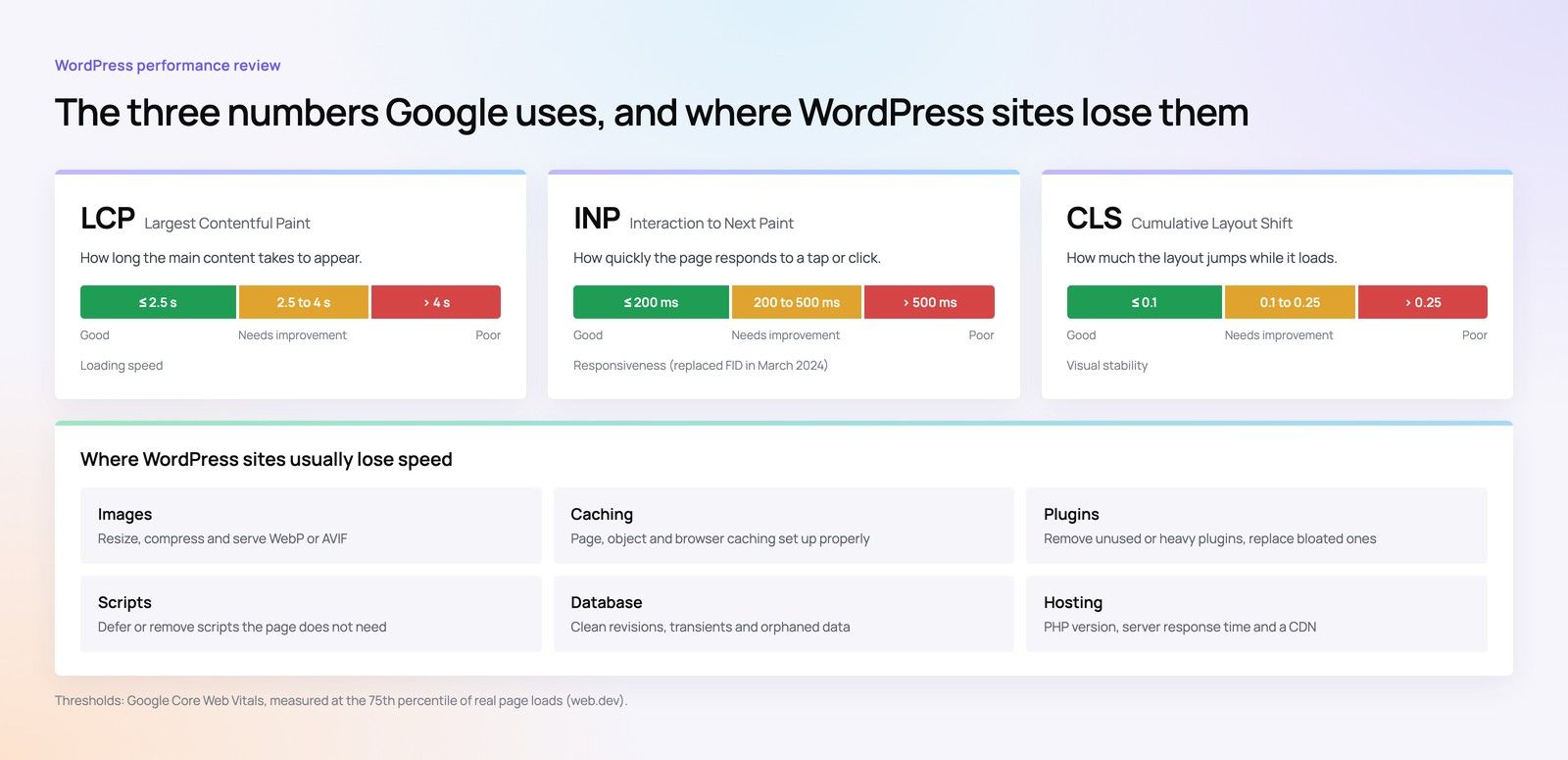
Core Web Vitals are assessed on real user data. Google's guidance treats an LCP of 2.5 seconds or less, an INP of 200 milliseconds or less and a CLS of 0.1 or less as good, measured at the 75th percentile of page loads for mobile and desktop separately, as described on web.dev.
Set up your baseline
- Field data first. Check the Core Web Vitals report in Google Search Console and the field data section of PageSpeed Insights. These show what real visitors experience.
- Test by template, not by URL. On WordPress, problems follow templates: the homepage, a single post, a service page, a product page, an archive. Pick one representative URL for each.
- Lab tests for diagnosis. Lighthouse and browser developer tools explain why a page is slow, but lab scores are not the same as the field assessment.
- Record the stack. Note the theme, page builder, active plugins, PHP version and hosting plan, so you can link changes to results.
If you need a broader view of where to start on any platform, our guide to a fix order for slow websites sets priorities before you open the dashboard.
Server and hosting: the foundation for every metric
Time to first byte is not a Core Web Vital, but a slow server response delays everything after it, especially LCP. On WordPress, the server has to run PHP and query the database before it sends any HTML, unless a cached copy is ready.
Hosting checklist
- Run a currently supported PHP version that your theme and plugins are compatible with.
- Enable full page caching, at server level where the host supports it, or through one well configured caching plugin. Never run two caching plugins together.
- Add a persistent object cache, such as Redis or Memcached, for dynamic sites like WooCommerce stores, membership sites and busy blogs.
- Use a CDN for static assets, and consider edge caching of HTML for pages that are the same for every visitor.
- Choose server locations close to your audience. For a UAE audience, a data centre in or near the Gulf, or a CDN with nearby points of presence, shortens round trips.
- Clean the database: old revisions, expired transients, spam comments and leftover tables from removed plugins.
- Check WP Cron. On busy sites, replace page load triggered cron with a real server cron job.
WordPress LCP: getting the main content on screen
Largest Contentful Paint is usually the hero image, a large heading or a featured image. WordPress LCP problems tend to come from four sources.
1. The LCP image
- Do not lazy load the hero image. Since WordPress 6.3, core avoids lazy loading in viewport images and adds fetchpriority="high" to the image it judges most likely to be the LCP element, according to the WordPress 6.3 developer note. Themes, builders and optimisation plugins can override this, so check the final HTML.
- If the hero is a CSS background image, the browser finds it late. Use a real image element instead, or preload it.
- Avoid sliders and carousels as the first element. They often delay the main image behind JavaScript.
2. Image optimisation in WordPress
- Serve correctly sized images. WordPress generates several sizes and a srcset, but only if the theme registers sensible sizes and uses them.
- Use modern formats. WebP is widely supported, and since WordPress 6.5 AVIF can be uploaded where the server's image library supports it.
- Compress on upload with one image optimisation plugin or a CDN image service, not both.
- Set width and height attributes on every image so the browser reserves space.
3. Render blocking CSS and JavaScript
- Inline the critical CSS for above the fold content and load the rest without blocking.
- Defer scripts that are not needed for first render.
- Stop plugins loading their assets on every page. A form plugin's styles belong on the contact page, not the homepage. Many performance plugins allow per page asset control; custom themes can handle it in code.
4. Fonts
- Self host fonts rather than calling an external font service, and keep to a small number of weights.
- Preload the one or two font files used above the fold.
- Use font-display: swap or optional so text appears quickly.
- For bilingual English and Arabic sites, load the Arabic font only on Arabic pages.
WordPress INP: making interactions respond quickly
Interaction to Next Paint measures how quickly the page responds when someone taps, clicks or types. It replaced First Input Delay as a Core Web Vital in 2024. On WordPress, poor INP is almost always caused by too much JavaScript running on the main thread.
Common WordPress causes
- Page builders that ship large script bundles for animations, tabs, popups and sliders on every page.
- Third party tags: chat widgets, heatmaps, multiple analytics tools and advertising pixels, often added through a tag manager without review.
- Plugins with front end scripts that run whether or not the page uses their feature.
- jQuery dependent code in older themes and plugins, which adds weight and long tasks.
- Heavy WooCommerce features such as live cart fragments, filters and product quick views.
INP checklist
- Audit every third party script. Remove what nobody uses; delay the rest until after the page is interactive or until the user interacts.
- Replace builder widgets for simple elements, such as accordions and tabs, with native HTML or lightweight blocks.
- Break up long JavaScript tasks in custom code, and avoid running heavy work in click handlers.
- Keep the DOM small. Builder layouts with many nested wrappers make every update slower.
- Test interactions on a mid range Android phone, not only on a fast laptop.
For larger stores, our WooCommerce at scale checklist covers cart, search and checkout specific fixes.
CLS: keeping the layout still
Cumulative Layout Shift measures how much content moves while the page loads. WordPress sites usually shift for predictable reasons.
| Cause | WordPress fix |
|---|---|
| Images and embeds without dimensions | Set width and height in the theme templates; use aspect ratio wrappers for video embeds |
| Web fonts swapping | Preload key fonts and choose fallbacks with similar metrics |
| Cookie notices and promotional bars injected at the top | Reserve space in the layout or show them as overlays that do not push content |
| Ads and dynamic widgets | Give each slot a fixed minimum height |
| Late loading menus and sticky headers | Render the header in the initial HTML instead of building it with JavaScript |
Theme and plugin choices that decide your ceiling
Caching and image tweaks can only do so much if the theme and plugin stack is heavy. The biggest long term gains often come from structural changes.
Theme
- Multipurpose themes load code for features you never use. A lean or custom theme built on core blocks loads far less.
- Check how the theme handles block styles. Loading only the styles for blocks present on a page reduces CSS considerably.
- Avoid nesting a page builder inside a heavy theme; you pay for both.
Plugins
- Remove plugins you no longer use, and consolidate overlapping ones.
- Check what each remaining plugin loads on key templates.
- Use one performance plugin for caching and asset optimisation rather than several that compete.
Speculative loading
WordPress 6.8 introduced speculative loading using the browser's Speculation Rules API. By default it prefetches pages with conservative eagerness, starting when a visitor begins clicking a link, and it is not active for logged in users, according to the WordPress 6.8 developer note. It can make navigation between pages feel faster, but it does not fix a slow first page view.
WordPress speed optimization checklist by priority
- Confirm field data for each key template and note which metric fails.
- Fix server response: caching, object cache, PHP version, hosting location.
- Fix the LCP element on each template: priority, size, format, no lazy loading.
- Remove unused plugins and third party scripts; stop site wide asset loading.
- Bring fonts under control: self hosted, preloaded, fewer weights.
- Reserve space for images, embeds, banners and ads.
- Replace heavy builder widgets and sliders on key pages.
- Retest in the lab, then watch field data over the following weeks, since it reflects a rolling window of real visits.
Hypothetical example: a Dubai clinic's WordPress site passes on desktop but fails LCP and INP on mobile. The homepage hero is a lazy loaded slider, and a chat widget, two analytics tags and a builder animation library load on every page. Replacing the slider with a single prioritised image, delaying the chat widget until interaction and removing the unused animation library address both failing metrics without a redesign.
To stop the same problems returning, agree a performance budget for new features; our guide to building speed in during development explains how. Plugin updates and new tools should also pass a security review, covered in our WordPress security hardening baseline.
Get your WordPress site passing Core Web Vitals
Codeeo works on WordPress Core Web Vitals across hosting, themes, plugins and front end code. Our Core Web Vitals service covers measurement and fixes, the speed optimisation quick start is a focused first step, and our WordPress development team can rebuild a heavy theme when tweaks are not enough. With 200+ projects delivered across the UAE and the US and an office in Dubai, UAE clients can meet the team in person. Contact us to review your site.
Frequently asked questions
The lab score comes from one simulated load on a test device, while the Core Web Vitals assessment uses real visitor data over recent weeks.
Real users may be on slower phones and networks, interact with the page in ways a lab test does not, or land on templates you did not test. Treat the field data as the result and the lab test as a diagnostic tool.
Web DevelopmentWordPress VIP or Self Hosted Enterprise WordPress in the UAEWordPress VIP or self hosted enterprise WordPress in the UAE: compare data residency, hosting SLA, cost drivers and code review rules, plus key setup notes. Web DevelopmentWhat a WordPress Maintenance SLA Should CoverWhat WordPress maintenance services should cover in writing: core and plugin updates, security, backups, multilingual publishing support and response times.
 Web DevelopmentWordPress Release Management: Staging, QA and RollbackA WordPress deployment workflow that releases safely: Git based builds, a staging site that mirrors live, smoke tests to run and a rollback plan written first.
Tell us what the business needs. We will tell you what to build first.
Schedule a free consultation and get a written recommendation, with costs, before you commit to anything.
Get in touchPROVEN RESULTS
4.7 / 5verified reviews on Google