 Web DevelopmentWordPress VIP or Self Hosted Enterprise WordPress in the UAEWordPress VIP or self hosted enterprise WordPress in the UAE: compare data residency, hosting SLA, cost drivers and code review rules, plus key setup notes.
Website Maintenance Plans in Dubai: What Each Tier Includes
Website maintenance packages in Dubai compared: what basic, standard and business critical tiers include, typical response times and how SMEs should choose.
Most website maintenance packages Dubai agencies offer fall into three tiers: basic, standard and business critical. The difference between them is not the list of tasks so much as how fast someone responds when something breaks and how much proactive work happens before it does. Pick the tier that matches what an hour of downtime would cost your business, not the one with the longest feature list.
This guide explains what each tier normally includes, how to judge response times, and the questions that separate a real care plan from a monthly invoice for occasional plugin updates.
What website maintenance packages Dubai SMEs buy actually cover
Every maintenance plan, at any tier, should handle four jobs: keeping software up to date, keeping recoverable backups, watching for problems, and fixing them. The tiers differ in how often each job happens, who checks the result, and how quickly a person acts.
- Updates: CMS core, plugins or modules, themes and server software such as PHP.
- Backups and updates testing: copies of files and database, stored away from the live server, and a check that they can be restored.
- Monitoring: uptime, security scanning, SSL certificate expiry, form delivery and performance.
- Support: fixing faults and making small content or layout changes.
Software updates are not optional housekeeping. WordPress, for example, publishes guidance on updating core, themes and plugins, and PHP itself has a published support schedule after which a version stops receiving security fixes. A plan that skips these leaves the site exposed even if it looks fine.
The three tiers compared
| Area | Basic | Standard | Business critical |
|---|---|---|---|
| Typical site | Brochure site, few changes | Lead generation site, regular updates | Ecommerce, bookings, portals |
| Software updates | Monthly batch | Regular, tested on staging first | Tested on staging, urgent security patches applied quickly |
| Backups | Scheduled, stored off server | More frequent, restore tested periodically | Frequent database backups, regular restore tests |
| Monitoring | Uptime alerts | Uptime, security, forms, SSL | All of these plus transactions and integrations |
| Response to faults | Next business day | Same business day for serious faults | Fast response, including outside office hours |
| Small changes | Billed separately or a small allowance | Monthly allowance of hours | Larger allowance plus a named contact |
| Reporting | Short monthly note | Monthly report with issues and actions | Monthly report and periodic review meeting |
Treat these as patterns, not standards. Agencies label tiers differently, so compare what is written in each plan rather than the tier name.
Basic: for sites that rarely change
A basic plan suits a brochure website that exists to establish credibility and capture the occasional enquiry. Content changes a few times a year and a day of downtime would be inconvenient rather than costly.
What it should still include
- Monthly updates with a check that the site still works afterwards.
- Scheduled backups stored somewhere other than the web server.
- Uptime monitoring with alerts to the agency, not only to you.
- A clear way to report a fault and a stated response time.
Where basic plans fall short
Updates are often applied directly to the live site without testing, and backups are rarely restored to prove they work. If your contact form silently stops sending, a basic plan may not notice until a customer tells you. Ask whether form delivery is checked at all.
Standard: the right monthly website support for most SMEs
A standard plan fits businesses whose website generates leads every week: clinics, consultancies, trading companies, training providers and service businesses. The site changes regularly, connects to a CRM or email tool, and an outage costs real enquiries.
What it adds over basic
- Staging first: updates are tested on a copy of the site before going live, which prevents most update related breakages.
- Wider monitoring: security scans, SSL expiry, form submissions and performance checks.
- Restore testing: backups are restored periodically to prove they work.
- An allowance of hours for small changes such as new pages, banner swaps or text edits.
- Monthly reporting that lists what was updated, what failed and what was done about it.
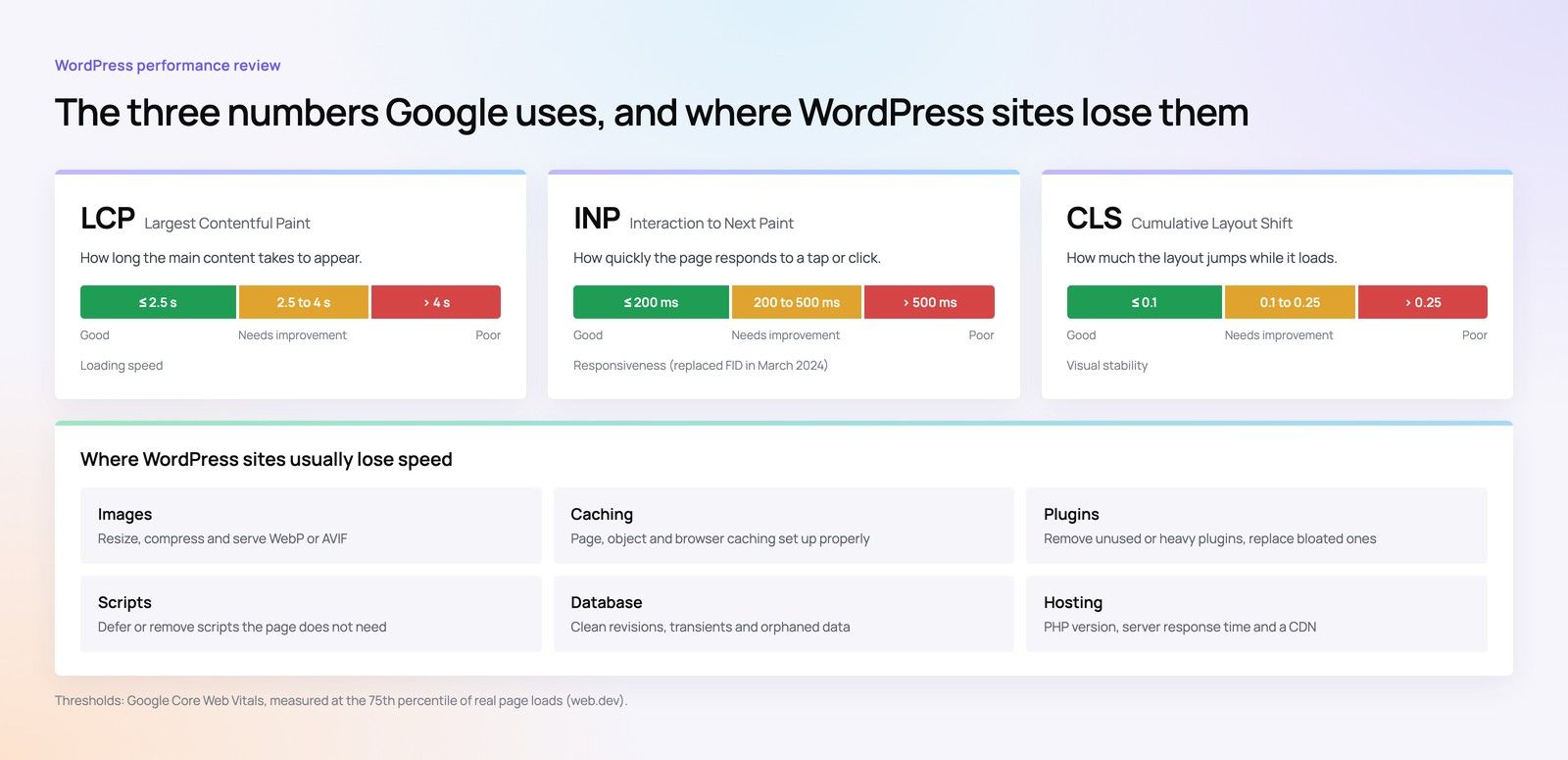
Performance belongs here too. Slow pages lose enquiries and search visibility, and Google's Core Web Vitals give a consistent way to track it over time. A good standard plan reports on these and flags plugins or media that drag them down.
Business critical: when downtime costs sales
If the website takes payments, accepts bookings, runs a customer portal or feeds orders into an ERP, a fault is a direct loss. A business critical plan is built around speed of response and protecting transactions.
What it adds over standard
- Response to serious faults outside office hours, including weekends and public holidays.
- Monitoring of checkout, payment and booking flows, not only whether the homepage loads.
- Integration checks for CRM, ERP, payment gateway and delivery partners.
- More frequent database backups, because orders and bookings change by the minute.
- A named account contact and a periodic review of risks, upcoming updates and improvements.
Hypothetical example: a Dubai flower shop runs a WooCommerce store with same day delivery. On a basic plan, a payment plugin update breaks checkout on a Thursday evening and nobody notices until Saturday. On a business critical plan, a transaction monitor alerts the agency within minutes, the update is rolled back from a recent backup, and the store is taking orders again before the evening rush ends. The tasks look similar on paper; the response is what the shop is paying for.
Large organisations with formal service level agreements, change control and audit requirements need a governance model beyond these tiers. That is a different conversation from an SME care plan.
How to choose a website care plan
- Estimate the cost of downtime. Think about lost enquiries, orders or bookings per day. The higher it is, the faster the response you need.
- List your integrations. Every connected system is another thing that can break after an update.
- Count your changes. If marketing needs weekly edits, an hours allowance is cheaper than ad hoc requests.
- Check where backups live and who restores them. WordPress recommends keeping backups in more than one place, and a restore is only proven once someone has done it.
- Read the exclusions. Plugin licence renewals, hosting, malware clean up and redesign work are often excluded.
What drives website maintenance cost
Rather than comparing monthly figures, compare the drivers. Website maintenance cost rises with the number of plugins and integrations, the age of the codebase, whether the site is ecommerce, the response hours you require, and the size of the change allowance. A site built cleanly with few dependencies is cheaper to maintain for years, which is why maintenance should be discussed before the build. Our guides to development hours, design versus build cost and website cost by project type cover the upfront side. If you are weighing an app, progressive web apps carry their own maintenance needs too.
Support that matches how your site earns
Codeeo supports live websites through a monthly retainer for improvements, fixes and updates, including WordPress sites, WooCommerce and Shopify stores and custom builds. We scope care plans around your integrations and how much downtime your business can absorb, and our Core Web Vitals work keeps performance in the monthly picture. If your site is already slow or fragile, a speed optimisation review is a sensible starting point before choosing a plan.
Our office is in Dubai, so UAE clients can meet the team that looks after their site. Contact us with your site address and tell us what it connects to, and we will recommend the tier that fits.
Frequently asked questions
Some businesses do, especially with simple sites.
The risk is consistency: updates get postponed, backups are never tested, and nobody watches forms or security alerts. If you keep it in house, assign a named owner, use a staging site for updates, document a restore process and test it. Many teams combine both, editing content themselves and leaving updates and monitoring to an agency.
Web DevelopmentWordPress VIP or Self Hosted Enterprise WordPress in the UAEWordPress VIP or self hosted enterprise WordPress in the UAE: compare data residency, hosting SLA, cost drivers and code review rules, plus key setup notes. Web DevelopmentWhat a WordPress Maintenance SLA Should CoverWhat WordPress maintenance services should cover in writing: core and plugin updates, security, backups, multilingual publishing support and response times.
 Web DevelopmentWordPress Release Management: Staging, QA and RollbackA WordPress deployment workflow that releases safely: Git based builds, a staging site that mirrors live, smoke tests to run and a rollback plan written first.
Tell us what the business needs. We will tell you what to build first.
Schedule a free consultation and get a written recommendation, with costs, before you commit to anything.
Get in touchPROVEN RESULTS
4.7 / 5verified reviews on Google