 Web DevelopmentWordPress VIP or Self Hosted Enterprise WordPress in the UAEWordPress VIP or self hosted enterprise WordPress in the UAE: compare data residency, hosting SLA, cost drivers and code review rules, plus key setup notes.
The Real Cost of Keeping an Old Website Running
Legacy website risks add up quietly: lost leads, patching, staff workarounds and security exposure. Estimate each cost and decide when replacing the site pays.

An old website rarely fails in one dramatic moment. The legacy website risks build quietly: enquiries that never arrive, hours of patching, staff working around broken features, and software that no longer receives security fixes. Adding those costs up, in hours and lost opportunities, is the clearest way to decide whether keeping the site is still cheaper than replacing it.
This article breaks the hidden costs into four groups, shows how to estimate each one for your own business, and ends with a simple test for when replacement starts to pay.
Why an outdated website feels cheap but is not
The site was paid for years ago. Hosting is a small line on the card statement. Nobody has asked for a budget. On paper, keeping it costs almost nothing.
The real costs sit in other places: in the sales pipeline, in the IT support log, in the marketing team's calendar and in the risk register. Because no single budget holder sees them all, an outdated website can survive long after it has stopped earning its keep.
Four legacy website risks and their hidden costs
1. Lost leads and lower conversion
Older sites tend to load slowly on phones, display poorly on small screens and use forms that are awkward to complete. Visitors who arrive from search or ads leave before they enquire. You do not see these people in any report, which is why this is usually the largest and least visible cost.
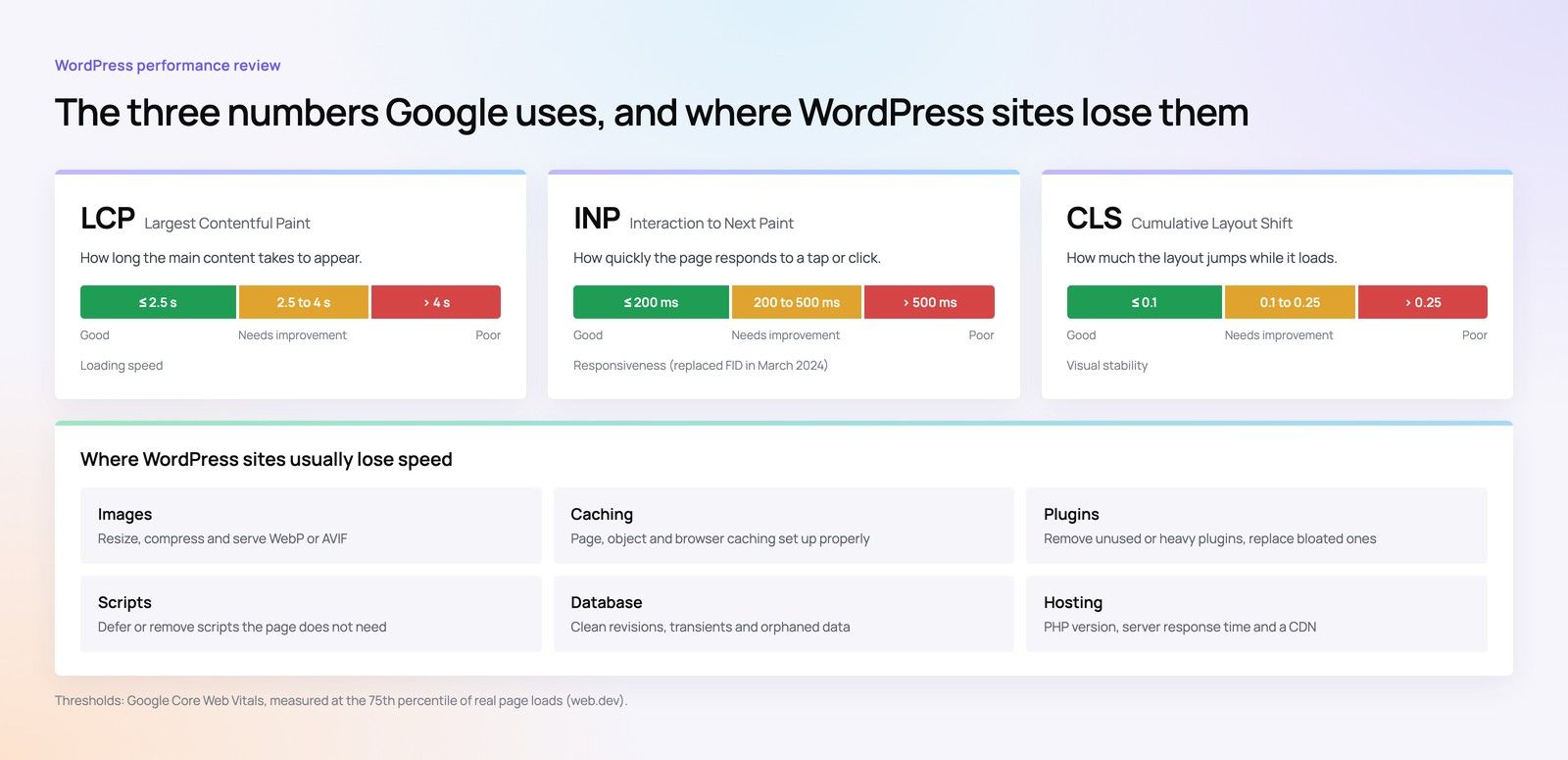
Google's Core Web Vitals measure loading, responsiveness and visual stability. Sites built on old themes and heavy plugins often struggle on all three, and a poor mobile experience weakens both search visibility and the return on paid traffic.
2. Patching and emergency fixes
Ageing code needs more attention. Plugin updates break layouts. A hosting provider retires an old PHP version and the site stops working. Contact forms stop sending after an email change. Each fix is small, but they add up, and they are often billed at short notice or handled by whoever on staff knows the login.
3. Staff workarounds
When a site cannot do something, people do it by hand. Common examples include:
- Copying form submissions from an inbox into the CRM.
- Asking a developer to change text because the CMS is too fragile to edit.
- Maintaining price lists or product details in two places.
- Sending brochures by email because the site cannot host downloads properly.
- Updating the Arabic version separately, weeks after the English one.
These hours rarely appear as a website cost, but they are one.
4. Security exposure
The most serious of the legacy website risks is software that no longer receives security updates. PHP versions reach end of life on a published schedule, and WordPress publishes recommended server requirements that move forward over time. A site stuck on unsupported versions, or on plugins abandoned by their authors, carries known vulnerabilities that cannot be fixed in place.
If the site collects personal data through forms, a breach also raises obligations under the UAE Personal Data Protection Law, or under DIFC or ADGM rules for companies registered there. The cost of an incident, in clean up, downtime and reputation, is far larger than the cost of prevention. Confirm your obligations with counsel where personal data is involved.
How to estimate the old website cost for your business
You do not need exact figures. Reasonable estimates, agreed with the people who do the work, are enough to make a decision. Use a simple worksheet like the one below and fill it in for the last twelve months.
| Cost area | What to count | Where to find it |
|---|---|---|
| Lost leads | Enquiry volume compared with similar periods, mobile bounce behaviour, form abandonment | Analytics, CRM, sales team estimates |
| Patching | Developer invoices, support tickets, hours spent on fixes | Accounts, IT log, agency invoices |
| Workarounds | Staff hours per week spent compensating for the site | Short interviews with marketing, sales and admin |
| Security exposure | Unsupported software versions, abandoned plugins, missing backups | Technical audit |
| Missed opportunities | Campaigns or features postponed because the site could not support them | Marketing plan, management notes |
Turn hours into money with your own rates
Multiply workaround and patching hours by the loaded cost of the people doing the work. For lost leads, multiply a cautious estimate of missed enquiries by your usual conversion rate and average deal value. Use your own internal figures here; they will be more convincing to your finance team than any industry benchmark.
Hypothetical example: a trading company in Sharjah
Hypothetical example: a trading company's site runs on an old WordPress theme with a dozen plugins. Over a year, the office manager spends a couple of hours each week moving enquiries into the CRM and fixing small display issues. An agency is called in four times for urgent repairs after updates. The sales director believes several large enquiries were lost when the contact form silently stopped working for a fortnight. A technical review finds two abandoned plugins with known vulnerabilities.
None of these items looked large on its own. Added together, and set against the cost of a new site spread over its expected life, they made replacement the cheaper option.
Technical debt on a website: what it means in practice
Technical debt is the extra work created when earlier shortcuts, outdated tools or rushed changes make every new change harder. On a website, it shows up as:
- Custom code nobody documented, written by a developer who has left.
- Plugins doing jobs that overlap or conflict.
- A theme modified so heavily that it cannot be updated.
- Content stored in ways that make migration slow.
Like financial debt, it accrues interest. Each year, changes take longer and break more often. At some point, paying it down by rebuilding is cheaper than continuing to service it.
Signs the costs have tipped
Replacement usually pays when several of these are true at once:
- The site runs on software versions that no longer receive security updates.
- Staff spend regular hours every week working around it.
- Simple content changes need a developer.
- Mobile performance is poor and cannot be fixed without changing the theme or platform.
- Marketing has postponed campaigns because the site could not support them.
- The site cannot connect to your CRM, booking system or payment provider.
If only one or two apply, a targeted fix may be enough. Our guide on whether to refresh, redesign or rebuild a website matches each symptom to the lightest fix that solves it.
What to do next
- Run a technical audit. Establish software versions, plugin status, backups, performance and security gaps.
- Fill in the cost worksheet. Gather estimates from sales, marketing and whoever maintains the site.
- Price the alternatives. Get quotes for targeted fixes and for a replacement. Our articles on website cost by project type and development cost measured in hours explain what drives those quotes.
- Compare over the same period. Set the yearly hidden cost against the yearly cost of a new site spread over its life. If you are weighing a template against a custom build, see template versus custom websites.
Find out what your current site is really costing
Codeeo has delivered 200+ projects across the UAE and the US, and a lot of that work starts with sites that have quietly become expensive. A website audit shows where the risks and workarounds sit. From there, our team can handle Core Web Vitals fixes, WordPress development or a planned site migration to a new build.
Contact Codeeo to book a review with the team in Dubai.
Frequently asked questions
Age alone is not a legal issue.
The concern is what the site does with personal data and how well it protects it. If forms collect names, phone numbers or other personal details, the UAE Personal Data Protection Law or the DIFC or ADGM regimes may apply. Unpatched software increases the chance of a breach, so ask counsel to confirm your obligations.
Web DevelopmentWordPress VIP or Self Hosted Enterprise WordPress in the UAEWordPress VIP or self hosted enterprise WordPress in the UAE: compare data residency, hosting SLA, cost drivers and code review rules, plus key setup notes. Web DevelopmentWhat a WordPress Maintenance SLA Should CoverWhat WordPress maintenance services should cover in writing: core and plugin updates, security, backups, multilingual publishing support and response times.
 Web DevelopmentWordPress Release Management: Staging, QA and RollbackA WordPress deployment workflow that releases safely: Git based builds, a staging site that mirrors live, smoke tests to run and a rollback plan written first.
Tell us what the business needs. We will tell you what to build first.
Schedule a free consultation and get a written recommendation, with costs, before you commit to anything.
Get in touchPROVEN RESULTS
4.7 / 5verified reviews on Google